



Table of Contents
Latency in online gaming is rarely just about how fast your internet is. In most cases, the real issue lies in how your connection is routed between your device and the game server. Two players with similar internet speeds can have completely different experiences simply because their data takes different paths across the network.
This is exactly the problem ExitLag is designed to address. Instead of increasing bandwidth, it attempts to optimize routing in real time, selecting more stable and efficient paths for your traffic. The key question is whether that optimization actually translates into measurable improvements in latency and stability.
If you’re still comparing gaming network optimization software, we’ve also tested LagoFast, GearUP Booster, and WTFast under real gaming conditions. Comparing these tools side by side can help you choose the best option for your setup.
After running multiple tests across different sessions and conditions, the answer is more nuanced than a simple yes or no. This ExitLag review covers real tests on ping, packet loss, and stability. See the results, pros, cons, and our final verdict.
You may also like:
- GearUP Booster Review: Test in 4 Games and Cool Features
- WTFast Review: Does it Really Lower Your Ping? Real Tests in Games
Exploring ExitLag Features (What Each Function Actually Does)
After understanding how routing optimization works, it’s important to look at what ExitLag actually offers in practice. The software is not just a “one-button fix” — it provides several tools focused on monitoring, route selection, and connection stability. Let’s understand some of the most important functions of ExitLag.
Automatic Route Optimization
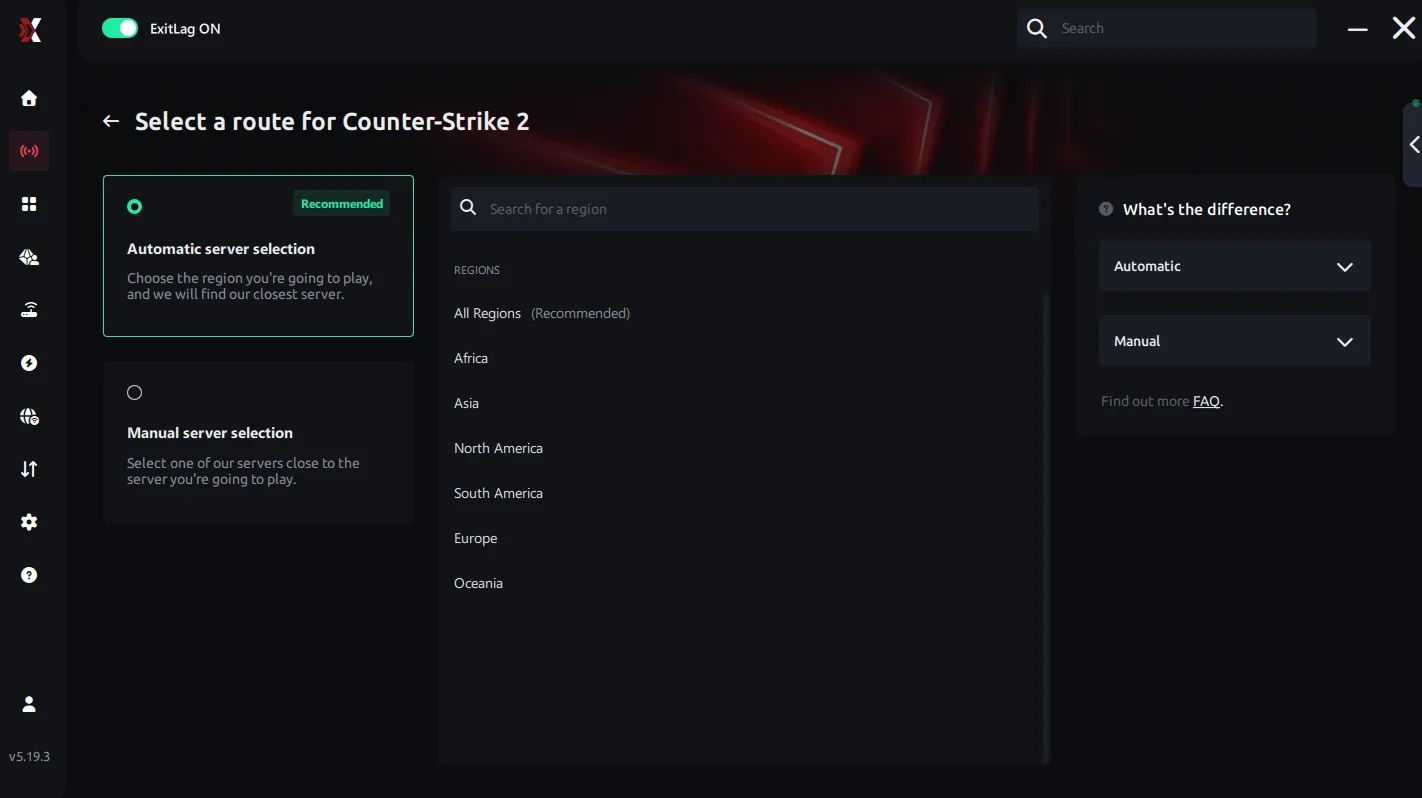
This is the core feature of ExitLag.
When enabled, the software continuously scans multiple available routes and automatically selects the one with the lowest latency and highest stability. If a route becomes unstable, it dynamically switches to a better one in real time.
This is what allows ExitLag to reduce lag spikes and improve connection consistency, not just average ping.
Network Analyzer
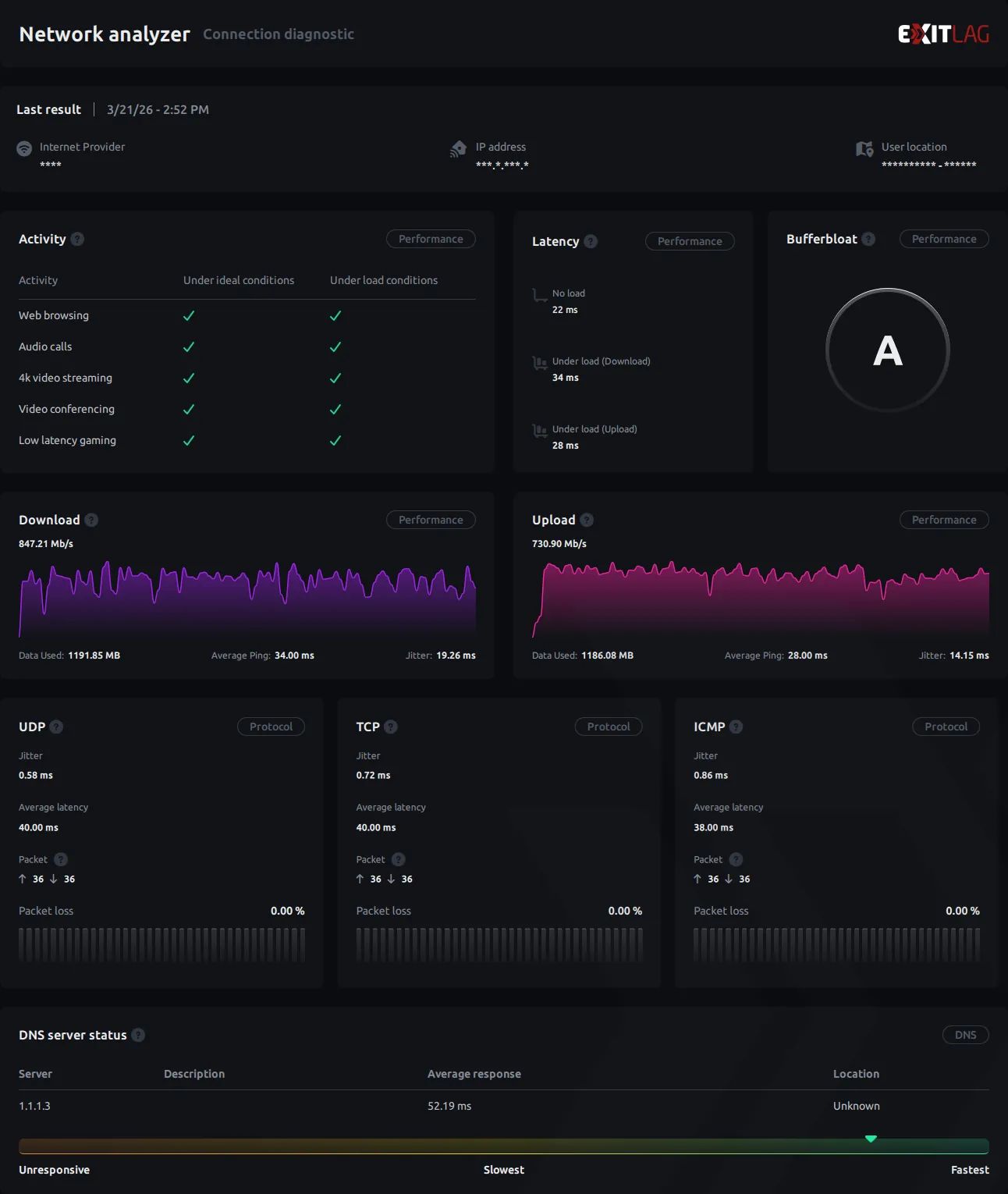
ExitLag provides a live view of your connection, showing:
- Latency (ping)
- Packet loss
- Route performance
- Connection stability
This feature is critical because it allows you to see exactly what is happening with your network, instead of relying only on in-game values.
It also helps confirm whether improvements are coming from better routing or just temporary fluctuations.
Multi Internet
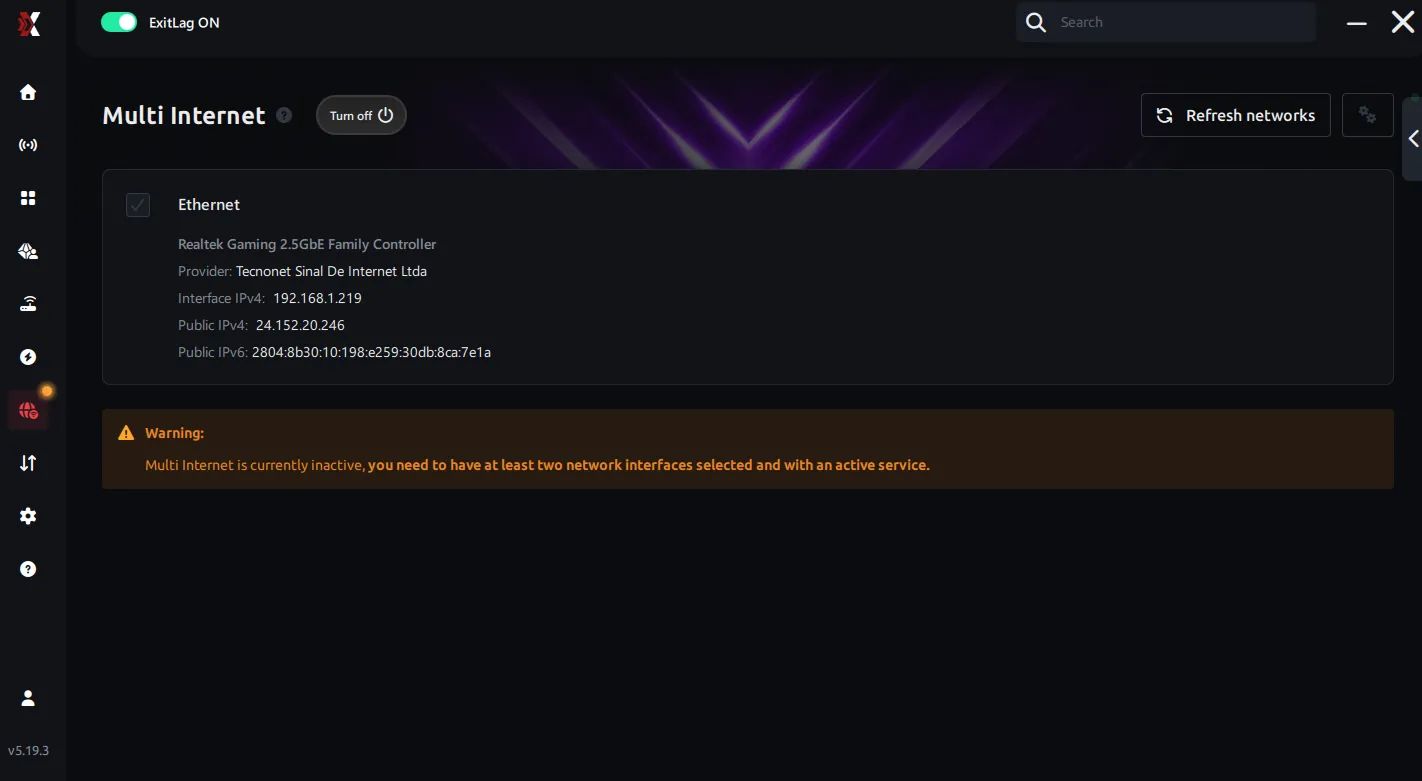
This feature allows ExitLag to use multiple internet connections simultaneously. Instead of relying on a single ISP route, it dynamically combines or switches between available networks to maintain stability.
The main goal is redundancy and consistency—if one connection becomes unstable or congested, traffic can be rerouted through a better path in real time, reducing lag spikes and disconnections.
PC Boost
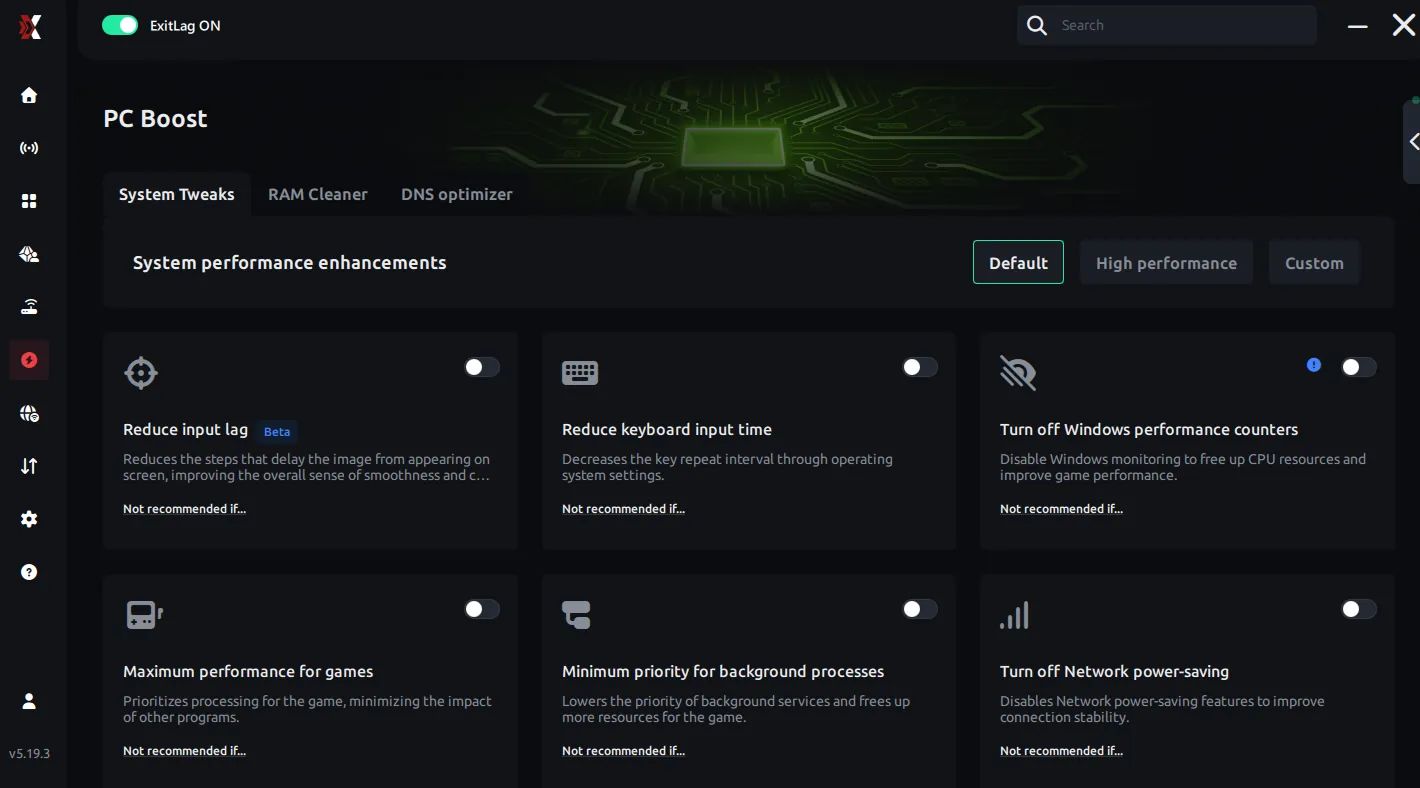
PC Boost is focused on local system optimization rather than network routing. It adjusts background processes, prioritizes game-related tasks, and frees up system resources like CPU and RAM.
By reducing unnecessary load on your machine, it ensures your game runs more smoothly, with fewer frame drops and better responsiveness during gameplay.
Traffic Shaper
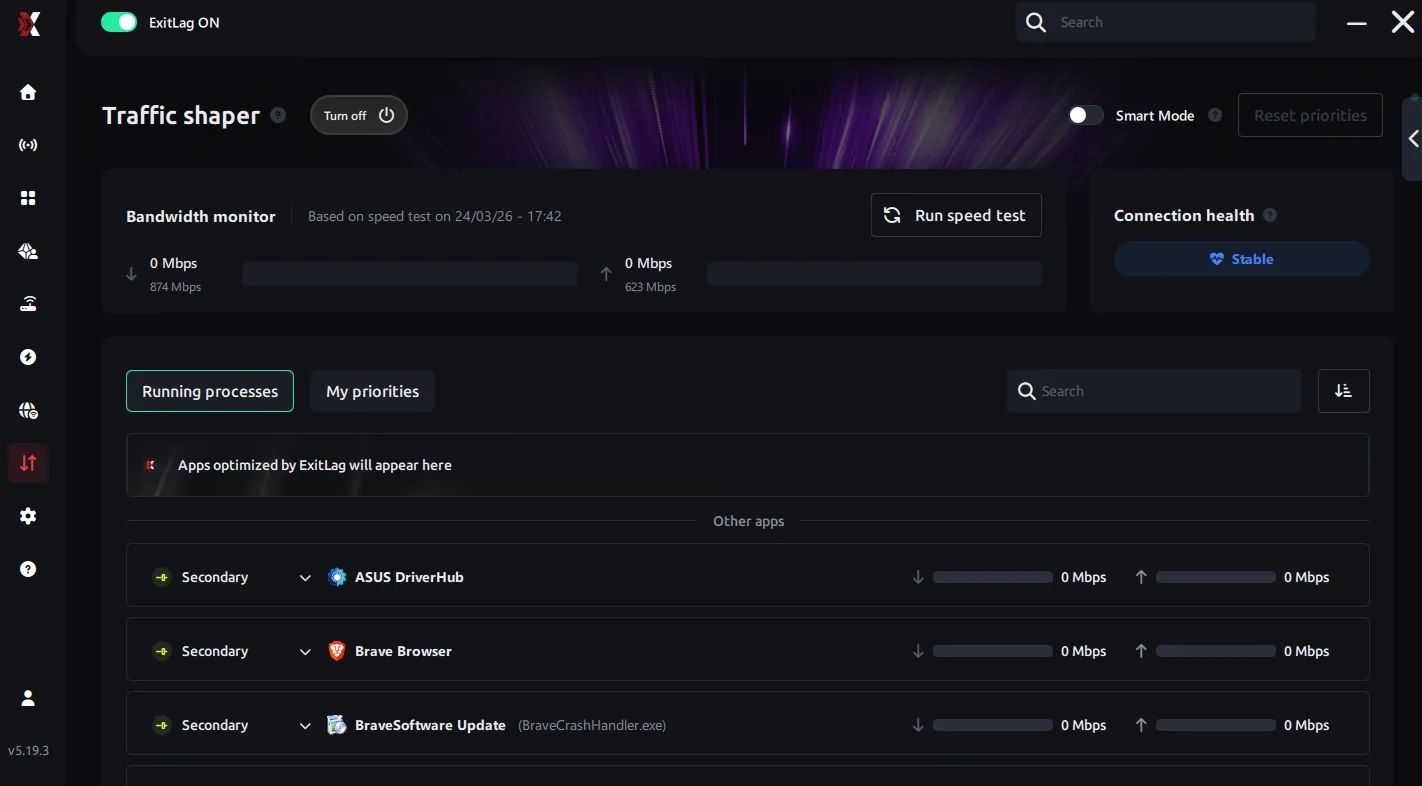
Traffic Shaper controls how your network data is distributed. It prioritizes game packets over other types of traffic (like downloads, streaming, or background apps).
This prevents bandwidth congestion from affecting your gameplay, ensuring lower latency and more stable packet delivery—even when your internet is being used for multiple tasks.
Beyond core routing, the application offers a variety of specialized tools designed for specific network and system scenarios.
How ExitLag Works in Practice
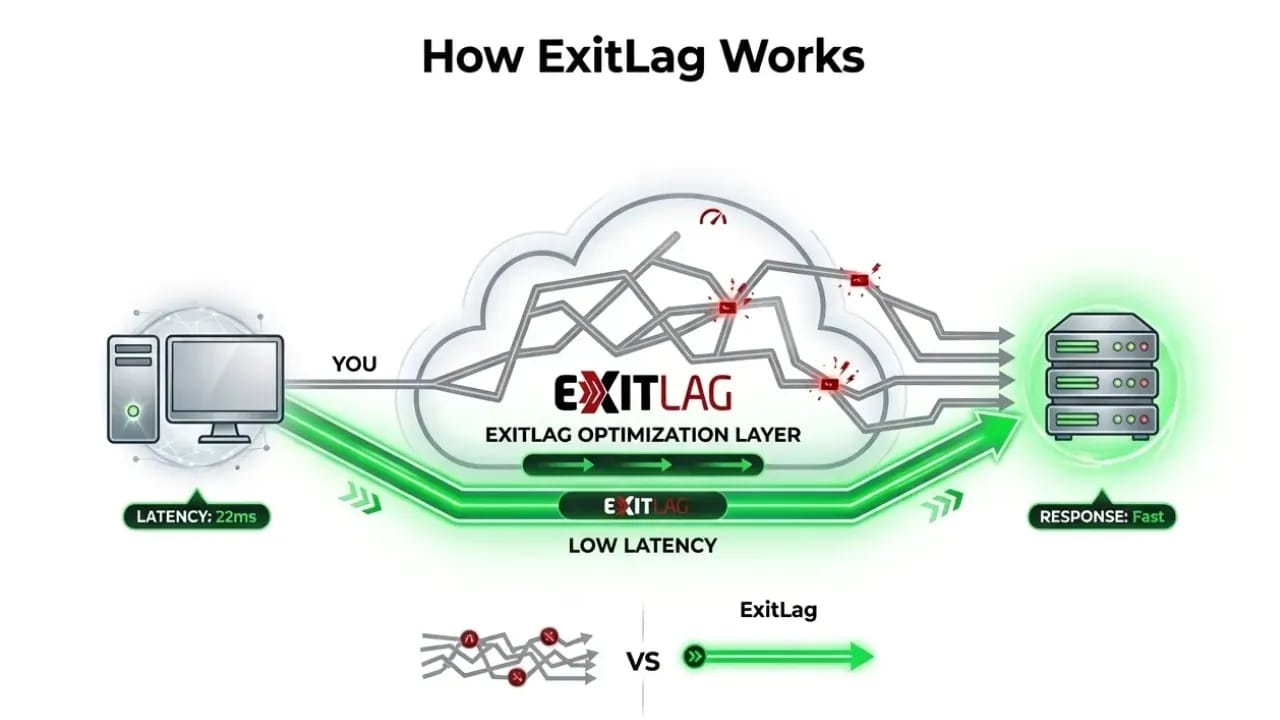
Under normal conditions, your ISP decides how your data travels to a server. This route is not necessarily optimized for latency. It may prioritize cost, infrastructure agreements, or load balancing, which can result in longer paths, higher latency, and unstable segments.
ExitLag intervenes by continuously analyzing multiple possible routes and dynamically switching to the most efficient one. Instead of relying on a single path, it selects the best available route in real time, avoiding congested or unstable nodes whenever possible.
This does not artificially reduce ping. What it does is eliminate routing inefficiencies that increase latency and cause instability.
Test Results and What Actually Changed
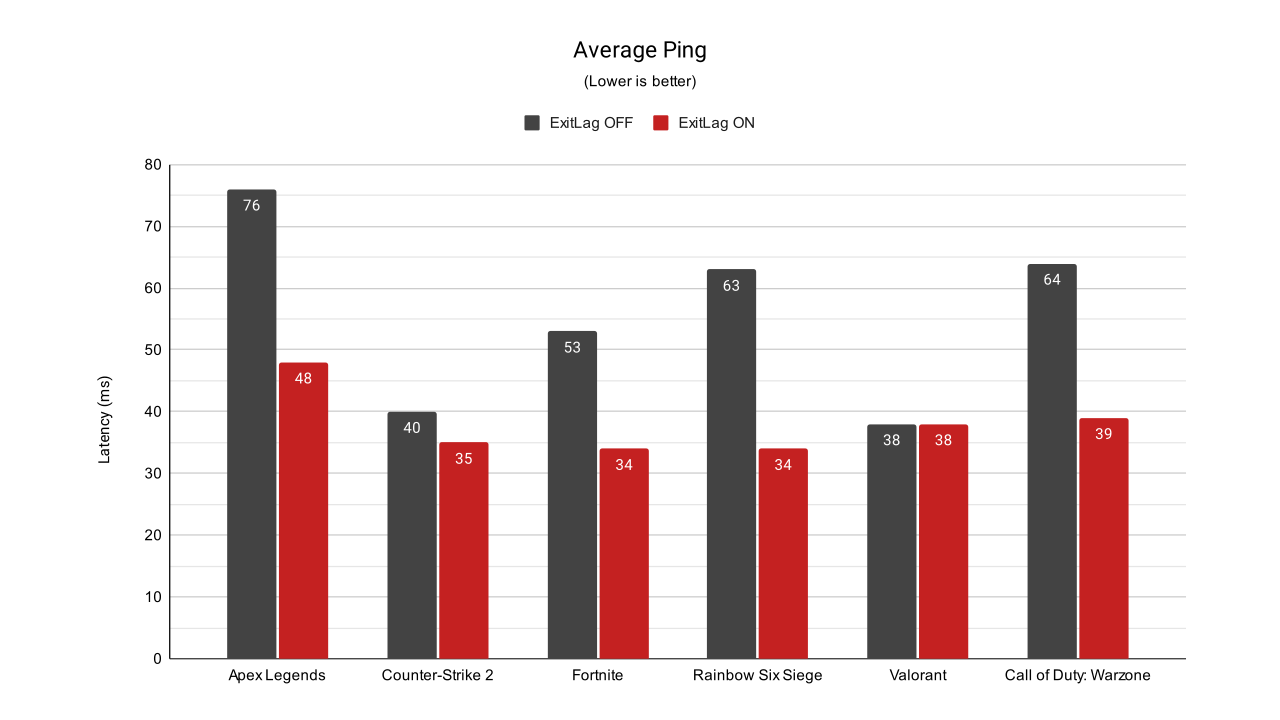
Based on the benchmark data, the difference between the standard connection and the one optimized by the software is clear. In the baseline tests (ExitLag OFF), latency varied significantly across titles, reaching a high of 76 ms in Apex Legends and 64 ms in Call of Duty: Warzone.
With ExitLag ON, there was a measurable reduction in almost every scenario. The most dramatic improvements were seen in Rainbow Six Siege, where latency dropped from 63 ms to 34 ms, and in Call of Duty: Warzone, which saw a decrease from 64 ms to 39 ms. In Apex Legends, the ping was reduced from 76 ms to 48 ms, while Fortnite improved from 53 ms to 34 ms.
A smaller but still present gain was recorded in Counter-Strike 2, moving from 40 ms to 35 ms. The only title that showed no change was Valorant, which remained stable at 38 ms in both states, indicating that the existing route for that specific server was already optimized.
Latency alone doesn’t tell the whole story. One of the most critical factors in a high-performance connection is jitter control, which ensures your data packets arrive at a consistent pace.
What Is Jitter (And Why It Matters More Than Ping)
Jitter refers to the variation in latency over time. Even if your average ping looks good, a high jitter means your connection is inconsistent. Data packets are not arriving at evenly spaced intervals, which creates instability.
In practical terms, this is what causes situations where the game feels fine one moment and slightly delayed the next. It directly affects timing, hit registration, and responsiveness.
During testing, the baseline connection had noticeable jitter, which translated into inconsistent gameplay. With ExitLag, the variation between latency measurements decreased, resulting in a more stable and predictable experience.
This is why, in many cases, a stable 60 ms connection feels better than an unstable 40 ms one. In the WTFast review, you can see how I test for jitter on my local network. I recommend doing this before testing any network optimization software.
Methodology: Test Setup, Network Configurations and Test Results
To ensure the most accurate and unbiased results, I standardized my network environment and ExitLag settings. Below are the specific technical details of the infrastructure used during the testing phase:
- Internet Connection: High-speed Fiber Optic (FTTH).
- Bandwidth: Symmetrical 800 Mbps Download / 800 Mbps Upload.
- Physical Connection: Tested exclusively via Ethernet Cable (Cat6) to eliminate any wireless interference or local Wi-Fi instability.
- ExitLag Configuration:
- Protocol: Manually set to 3 UDP routes to prioritize real-time packet delivery.
- Server Selection: Locked to Sao Paulo servers to test the most direct routing path available for the South American region.
No other extra configurations were performed within the software.
Fortnite
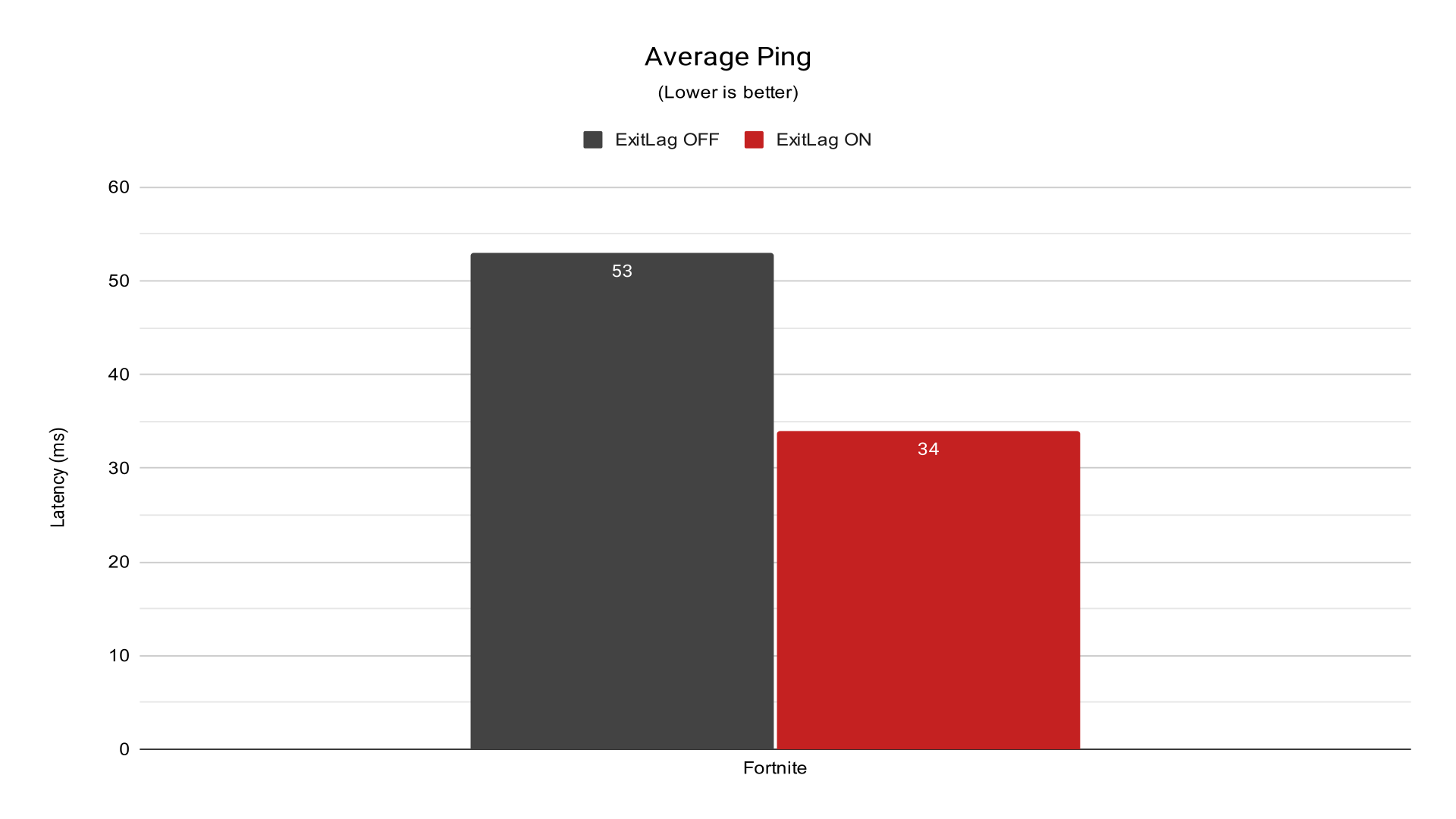
In Fortnite, low ping is essential not just for shooting, but for building and editing speed. A 19 ms drop allows structures to be placed with significantly less delay, giving a clear edge in “box fights” against players relying on default ISP routing.
Valorant
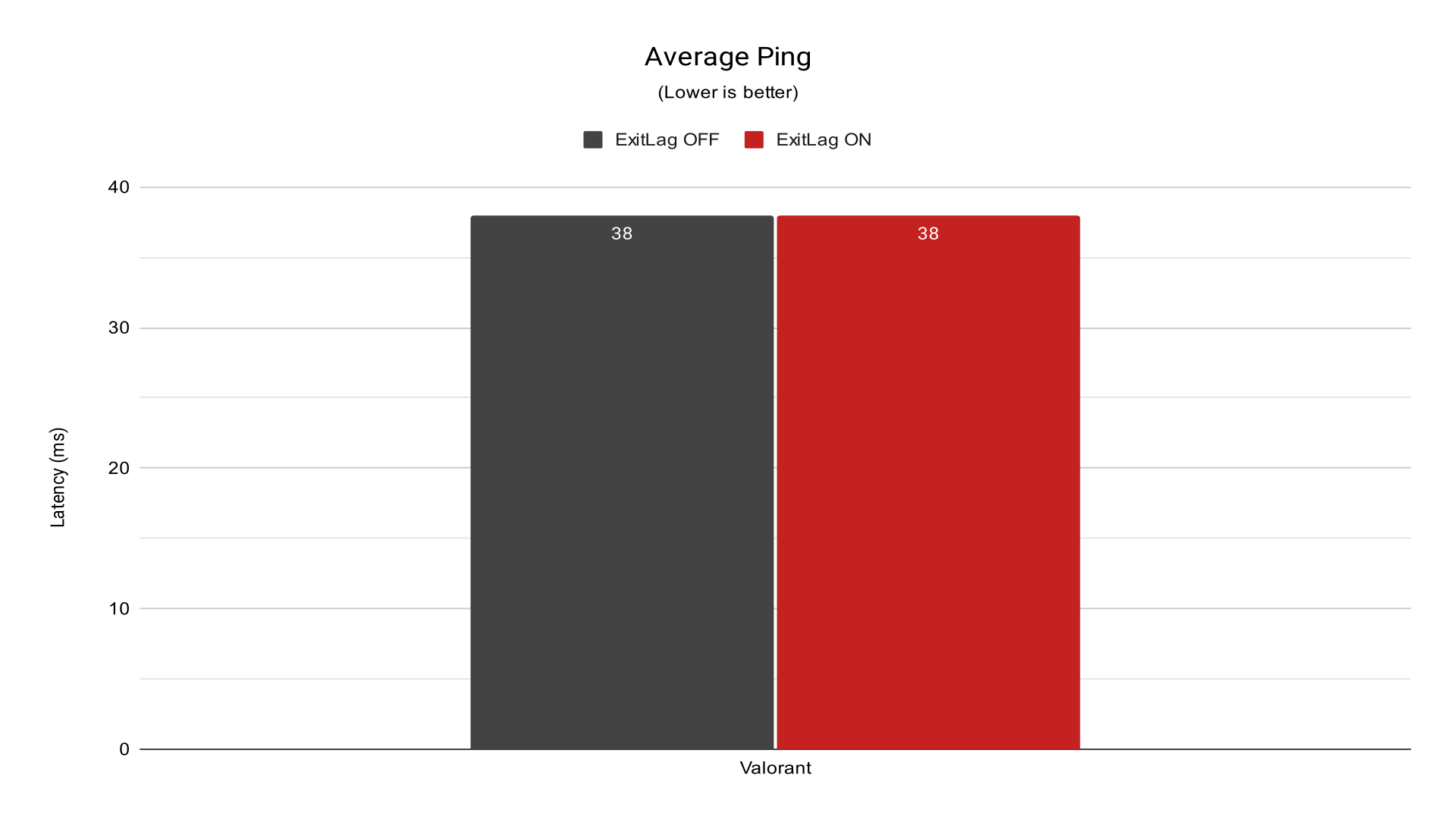
Valorant resulted in a technical tie. This happens when your ISP’s route to Riot Games’ servers is already operating at the physical limit of the distance. The fact that the ping did not increase shows that the software recognized the existing route as the best available and chose not to interfere aggressively.
Counter-Strike 2
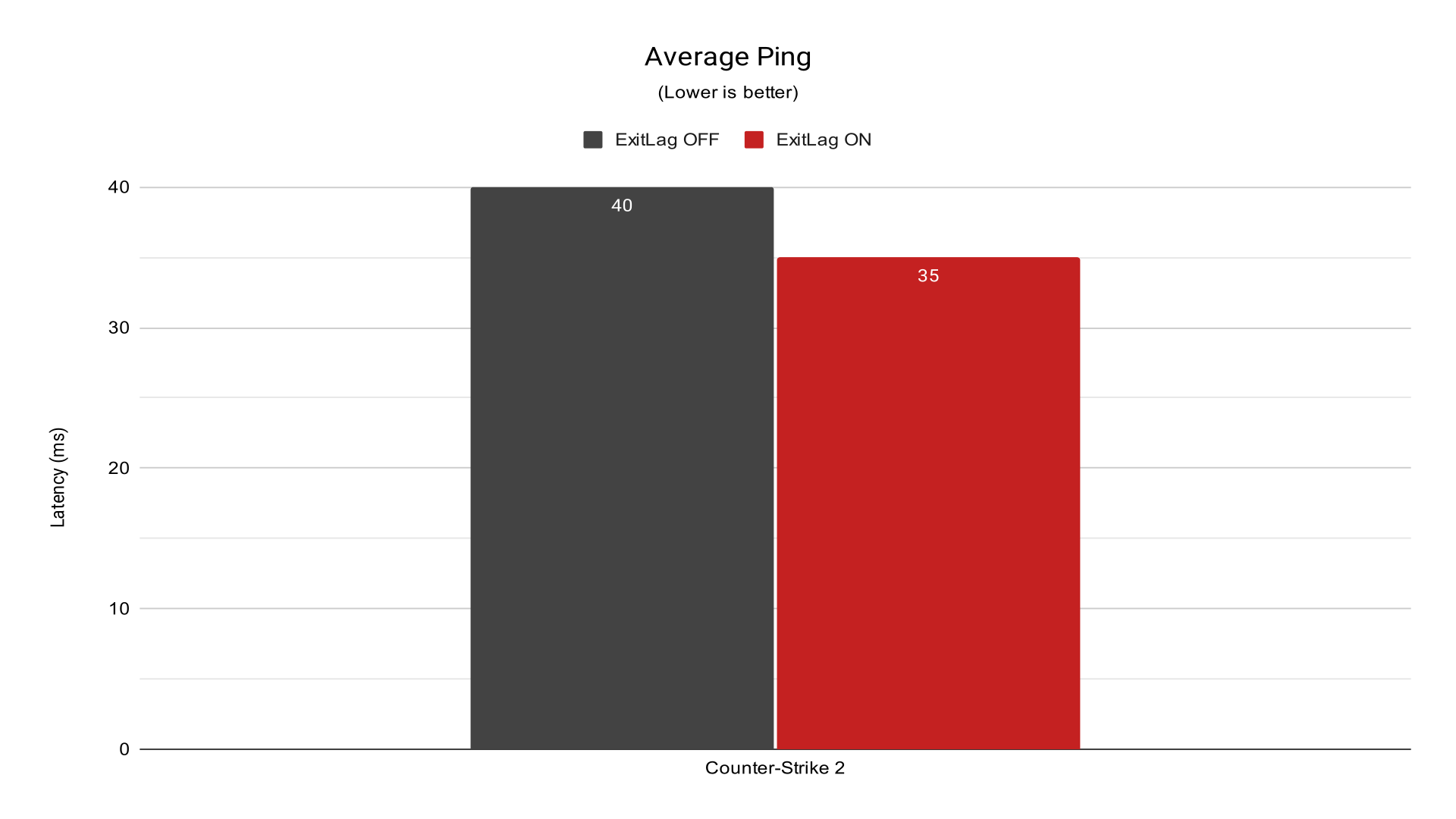
The gain here was subtle (5 ms). This indicates that the default route to Valve’s servers was already relatively efficient. However, even a small reduction in CS2 helps keep network “frametimes” stable, which is vital for the game’s sub-tick system.
Call of Duty: Warzone
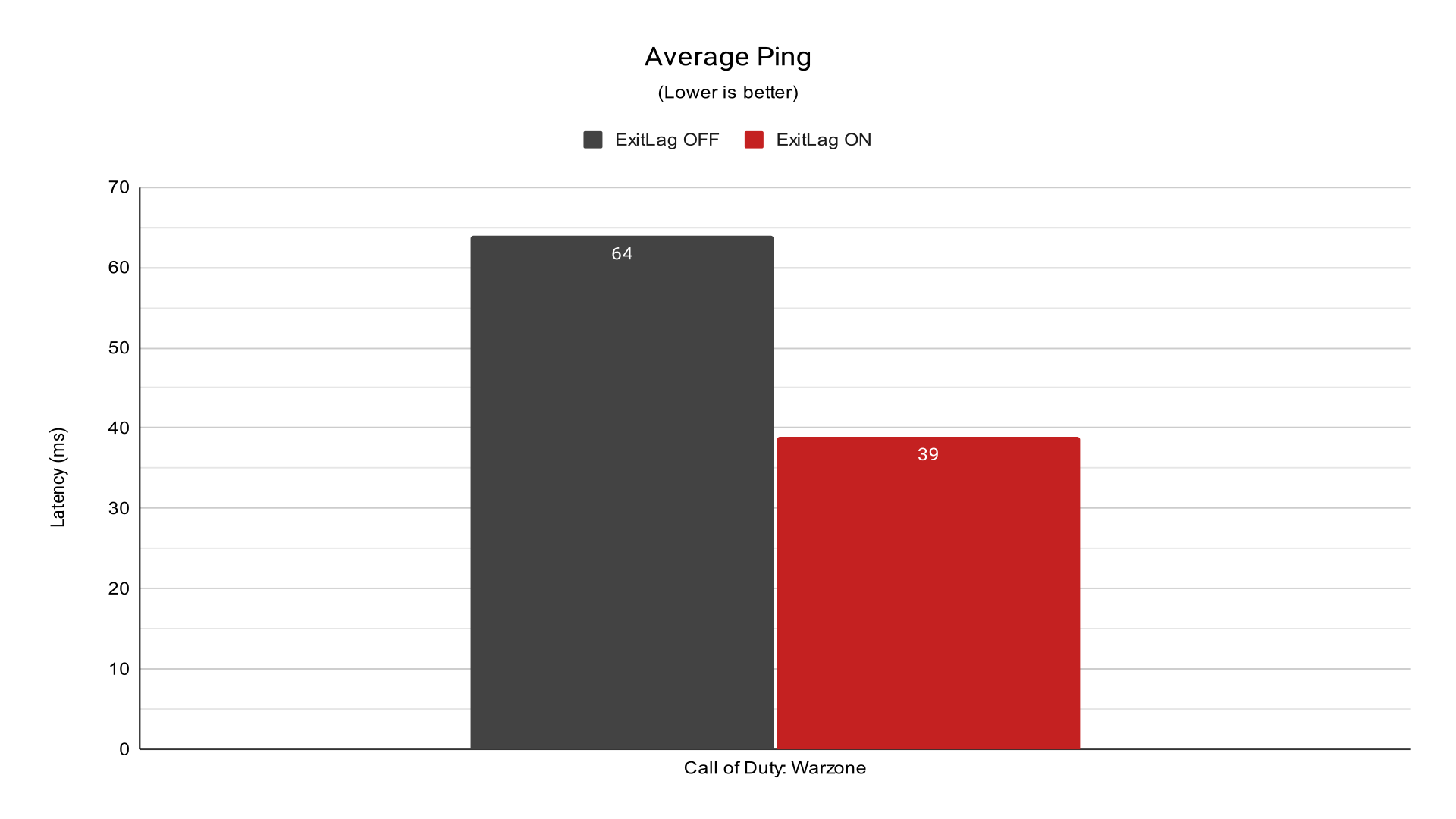
Similar to Apex, Warzone often suffers from unstable routing due to high server loads. Dropping from the 60s into the sub-40 ms range eliminates that “sluggish” feeling when looting or entering vehicles, ensuring your shots connect predictably in long-range engagements.
Rainbow Six Siege
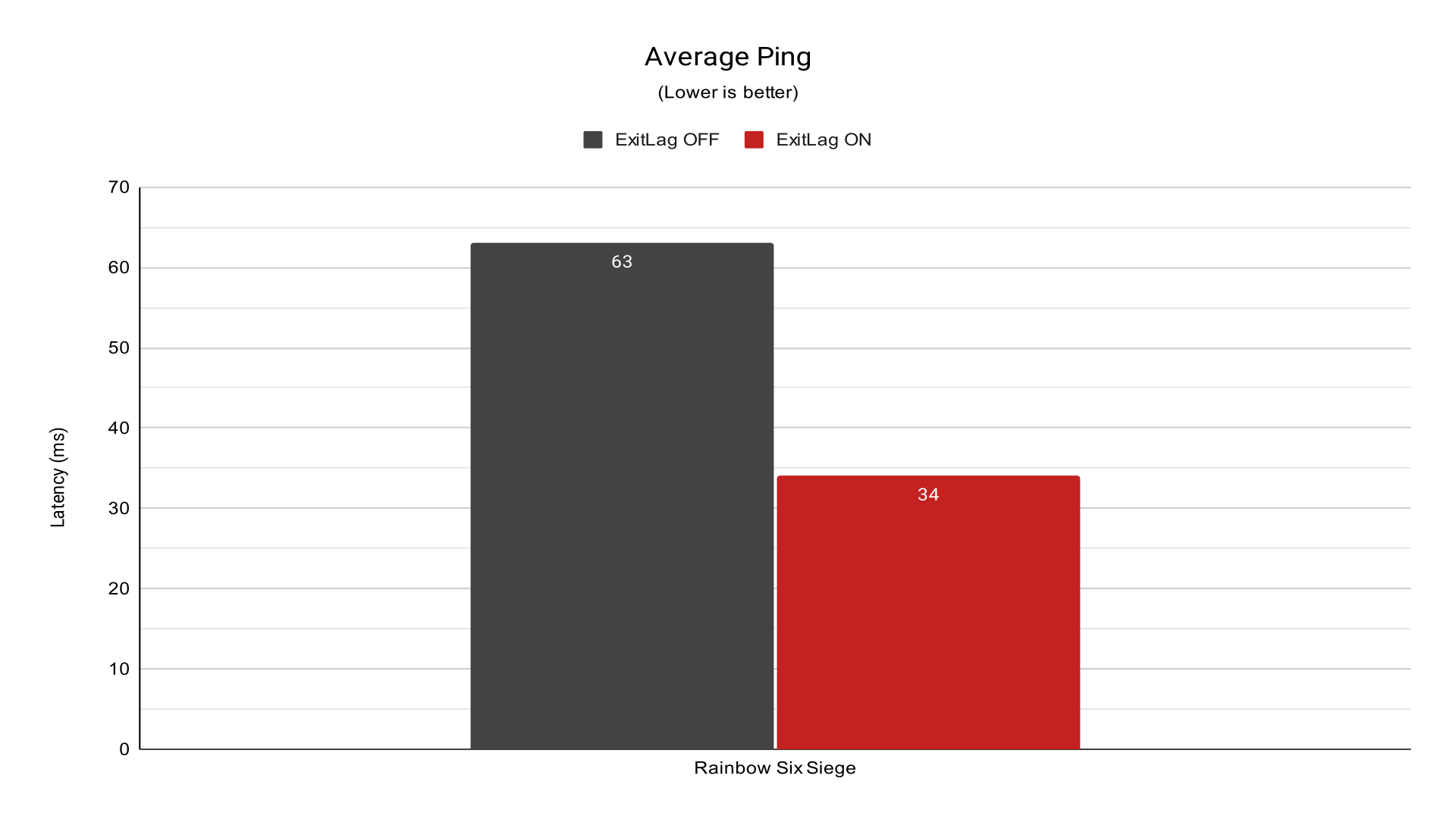
The most impressive percentage result of the test. Slashing the ping by nearly half (46% improvement) in a tactical FPS—where “peeker’s advantage” decides rounds—is a game-changer. At 34 ms, the gameplay reaches a professional competitive standard.
Apex Legends
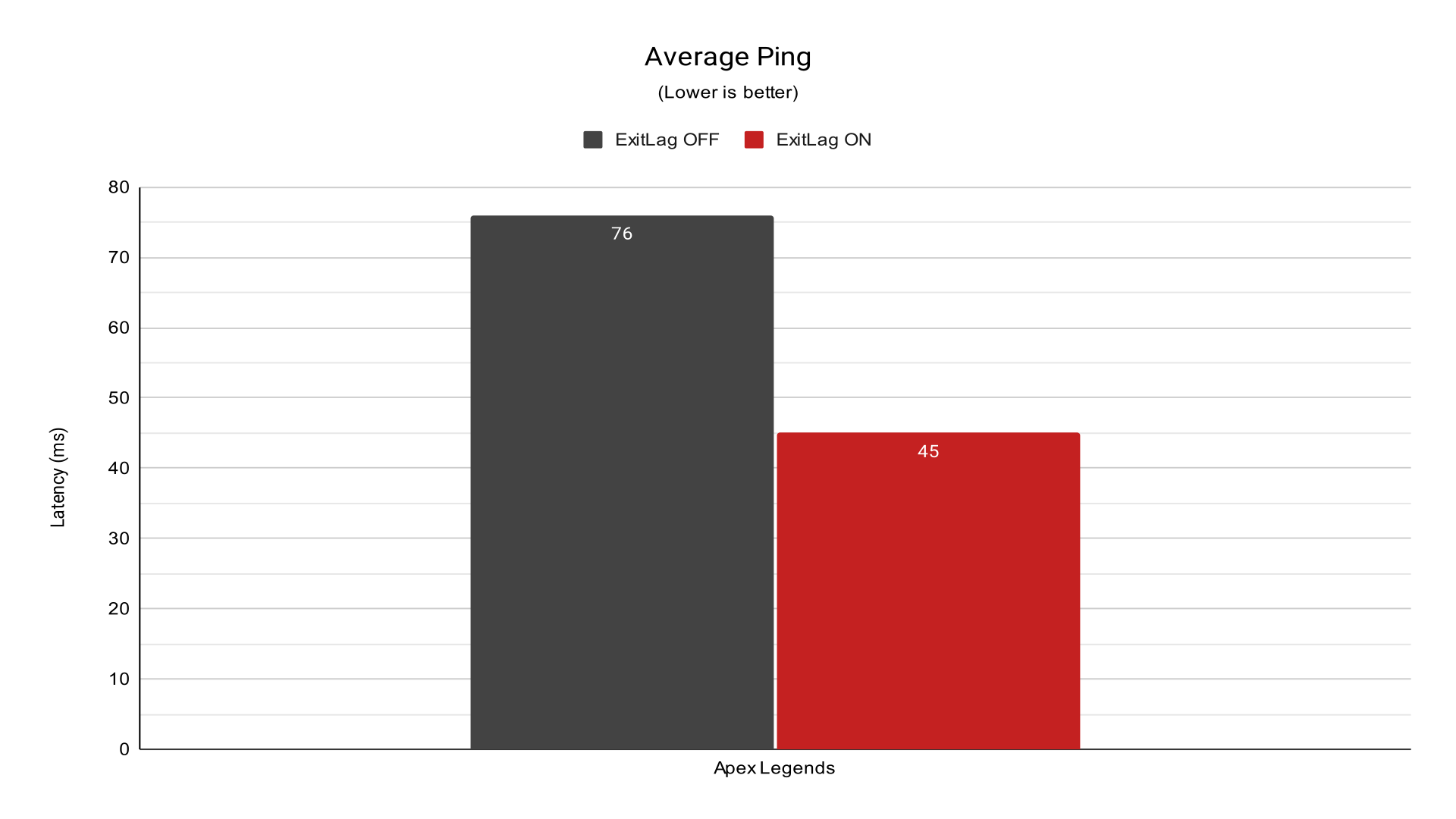
This was one of the titles with the highest raw gain. A 31 ms reduction in a fast-paced Battle Royale like Apex is the difference between tracking an enemy with precision and suffering from “ghosting” or “no-regs.” The stabilization here is critical for close-quarters combat.
Final Verdict: Is ExitLag Worth It?
Based on the test results, ExitLag proves to be effective when routing inefficiencies are present. The reduction in jitter and improved consistency can make a noticeable difference in how the game feels.
However, its effectiveness depends entirely on your starting point. If your connection is already well-routed and stable, the improvement will likely be minimal.
This is why experiences vary so much between users. The software is solving a specific network routing problem, and that problem does not exist for everyone. ExitLag is not a universal upgrade, but it is a technically valid solution for routing-related latency issues.
In scenarios where routing issues exist, it can reduce latency, minimize jitter, and stabilize the connection. In scenarios where the network is already optimized, its impact becomes negligible. The only reliable way to determine its value is through proper real-world testing under consistent conditions.
At the end of the day, the effectiveness of ExitLag depends entirely on how your connection is currently being routed by your ISP. If your network path is inefficient, the improvement can be noticeable. If it’s already optimized, there may be little to gain.
If you want to test it yourself, there’s a 3-day free trial with no credit card required. If you decide to subscribe afterward, you can use the coupon code 10253525 to get a discount. Using the link or coupon also helps support this type of in-depth testing and detailed performance analysis for future reviews.
FAQ (Frequently Asked Questions)
Is ExitLag good?
It depends on your current connection quality. ExitLag works by optimizing the route between your ISP and the game server. If your provider already has a perfect route, you might not see a significant difference in ping. However, if your connection is suffering from high latency, packet loss, or jitter due to bad routing, ExitLag can significantly improve your gaming experience. Keep in mind it helps with routing issues, but it won’t fix hardware problems or local Wi-Fi interference.
Is ExitLag free?
No. ExitLag offers a 3-day free trial with no credit card required, allowing you to test the service before committing. After the trial period, you need to choose a subscription plan (Monthly, Quarterly, or Yearly) to continue using the software and its optimization features.
Is ExitLag a VPN?
Technically, ExitLag is not a traditional VPN. While it does reroute your data, it only affects game traffic and does not hide your IP address or encrypt your entire connection like a standard VPN. This focus on gaming routes is exactly why it is more efficient for lowering ping than a regular VPN.
Is ExitLag legit?
Yes, ExitLag is 100% legit and safe to use. It is a well-established company in the gaming industry, officially partnered with major esports teams and streamers. It does not modify game files, so it is not considered a cheat and will not result in bans in games like Valorant, CS2, or League of Legends.
Is ExitLag on console?
No. Currently, ExitLag is a software designed for Windows, Android, and iOS. To use ExitLag on consoles (PS5, Xbox, or Switch), you need to share your PC’s optimized connection with your console via an Ethernet cable or use a compatible router.