


This GearUP Mobile Review tests whether GearUP Booster Mobile can actually reduce ping, latency spikes, and unstable routing in real mobile games. GearUP promises to improve the network route between your device and the game server, but the real-world results depend heavily on your existing connection.
But does it work in practice?
For this GearUP Booster Mobile review, I tested the app in real matches across six popular online games: PUBG Mobile, Mobile Legends: Bang Bang, Free Fire, Call of Duty: Mobile, Honor of Kings, and Fortnite. Rather than relying on the latency estimate shown inside the GearUP app, I compared the actual in-game ping with GearUP disabled and enabled under identical Wi-Fi conditions.
The goal was to answer three questions: does GearUP reduce latency in real gameplay, how consistent is the effect, and is the subscription worth paying for?
Disclosure: This article may contain affiliate links. If you purchase GearUP through one of these links, Games Catalogue may earn a commission at no additional cost to you. This does not influence the test results or conclusions in this review.
Playing on PC instead? I also tested the desktop version in real games. Read my full GearUP Booster Desktop review to see how it performed.
What Is GearUP Booster Mobile?
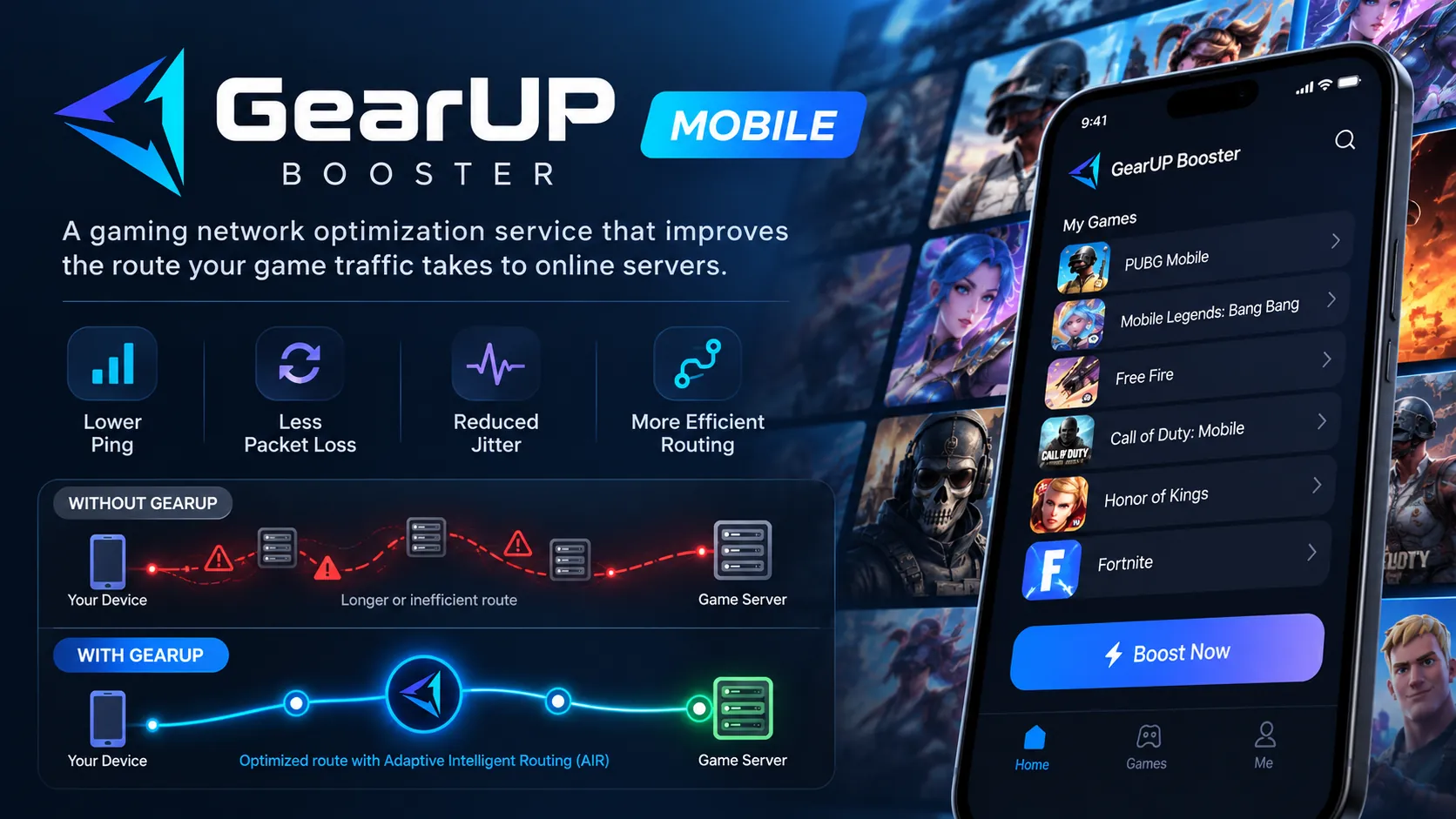
GearUP Booster is a gaming network optimization service that aims to improve the route your game traffic takes to online servers.
It does not increase your device’s processing power, graphics performance, or frame rate. Instead, it targets network problems such as high ping, packet loss, jitter, and inefficient routing.
GearUP describes its routing system as Adaptive Intelligent Routing (AIR) and advertises support for more than 3,000 games across its ecosystem. The service is available on Android and iOS, among other platforms.
On mobile devices, GearUP uses the operating system’s VPN functionality to redirect game traffic through its network, and the company states that this permission is required for route optimization to work. It is not designed as a privacy VPN for general browsing or for changing your location on streaming services. Its purpose is specifically to optimize gaming connections.
How GearUP Mobile Works
Normally, your internet service provider determines how your traffic travels from your home network to a game server, and that route is not always the most efficient.
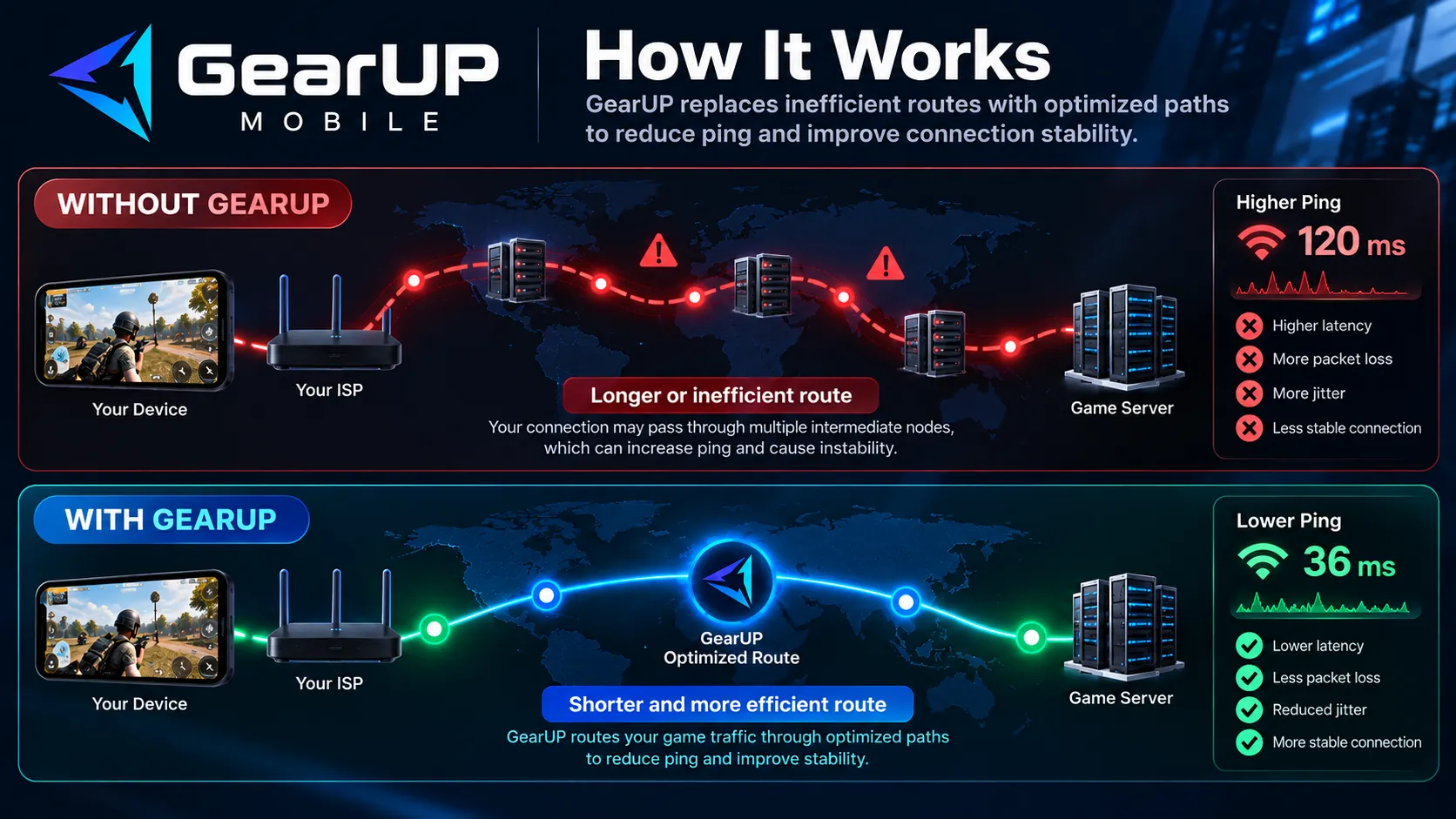
Your connection may pass through unnecessary intermediate nodes, congested networks, or poorly optimized peering points before reaching the server. GearUP replaces part of that path with one of its own routes. In theory, this can lead to three outcomes:
- Lower ping: the GearUP route is shorter or more efficient than your ISP’s.
- Similar ping, better stability: latency stays the same, but spikes and jitter are reduced.
- No improvement, or a regression: your ISP already uses an excellent route, leaving GearUP nothing to optimize.
That last scenario matters because no game booster can overcome the physical limits of distance. If your connection already reaches the server close to the lowest latency physically possible, there is little room left to improve.
GearUP Mobile Review Test Methodology
I designed the test to resemble a normal home gaming setup rather than an artificial network benchmark.
| Test Variable | Configuration |
|---|---|
| Device | Samsung Galaxy Tab S10 FE+ |
| Connection | Wi-Fi 6 (5 GHz) |
| Distance from router | Approximately 5 meters, one wall between device and router |
| Region | Brazil |
| Test type | Real gameplay |
| Comparison | GearUP OFF vs. GearUP ON |
| Sessions | Two recorded sessions per game for each condition |
| Primary measurement | In-game ping (as reported by each game) |
| Games tested | PUBG Mobile, MLBB, Free Fire, COD Mobile, Honor of Kings, Fortnite |
| Test environment | Samsung Secure Folder |
The tablet stayed in the same location and on the same network throughout. Whenever possible, the same game region or server was used for both the OFF and ON tests.
I used the latency displayed by the games themselves rather than GearUP’s estimated latency. The number shown inside a booster app does not necessarily represent what the game actually experiences.
The benchmark was conducted over Wi-Fi, so GearUP’s Dual Assurance Mode was not part of this comparison. That is a separate member feature that can use Wi-Fi and mobile data together and dynamically select between them to reduce severe latency or disconnections.
Limitations
Samsung Secure Folder was used as the test environment for all benchmark sessions. While this is a more isolated Android environment than a standard profile, both GearUP OFF and ON tests were performed under the same conditions, keeping the comparison consistent.
GearUP Booster Mobile Test Results
The table below shows the average in-game ping for each game. Positive differences mean higher latency with GearUP enabled (worse). Percentages are relative to the GearUP OFF baseline.
| Game | GearUP OFF (ms) | GearUP ON (ms) | Difference (ms) | Difference (%) | Result |
|---|---|---|---|---|---|
| PUBG Mobile | 20.00 | 24.20 | +4.20 | +21.0% | Worse |
| Mobile Legends: Bang Bang | 68.90 | 68.95 | +0.05 | +0.1% | No difference |
| Free Fire | 17.40 | 48.60 | +31.20 | +179.3% | Much worse |
| Call of Duty: Mobile | 42.40 | 43.90 | +1.50 | +3.5% | Slightly worse |
| Honor of Kings | 17.50 | 18.95 | +1.45 | +8.3% | Slightly worse |
| Fortnite | 43.05 | 46.40 | +3.35 | +7.8% | Worse |
| Average (six games) | 34.88 | 41.83 | +6.96 | +20.0% | Worse |
| Average (excluding Free Fire) | 38.37 | 40.48 | +2.11 | +5.5% | Slightly worse |
The averages are simple, unweighted means across the six games. Free Fire skews the overall figure heavily, which is why I also show the average without it. Even then, GearUP still ended up slightly slower than the normal connection.
Each game uses different server infrastructure, and your ISP may take a completely different route to each one, so the individual results are more informative than the averages.
PUBG Mobile
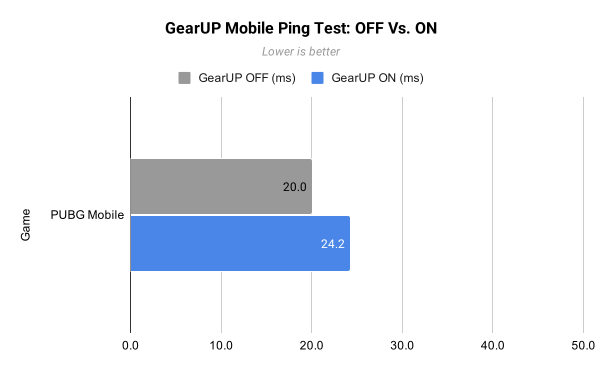
Without GearUP, both sessions averaged 20.0 ms. With GearUP enabled, the two sessions averaged 24.6 ms and 23.8 ms, for a combined 24.2 ms. That is an increase of 4.2 ms (+21%).
The result is consistent: both GearUP ON sessions were slower than both OFF sessions. I also recorded a 44 ms spike during one of the GearUP sessions, while typical latency with the booster stayed around 24 ms.
Conclusion: GearUP did not improve PUBG Mobile latency. The default route was already performing very well, and adding GearUP raised average ping by about 21%. When the existing route is already efficient, an alternative routing service can make the connection worse rather than better.
Free Fire
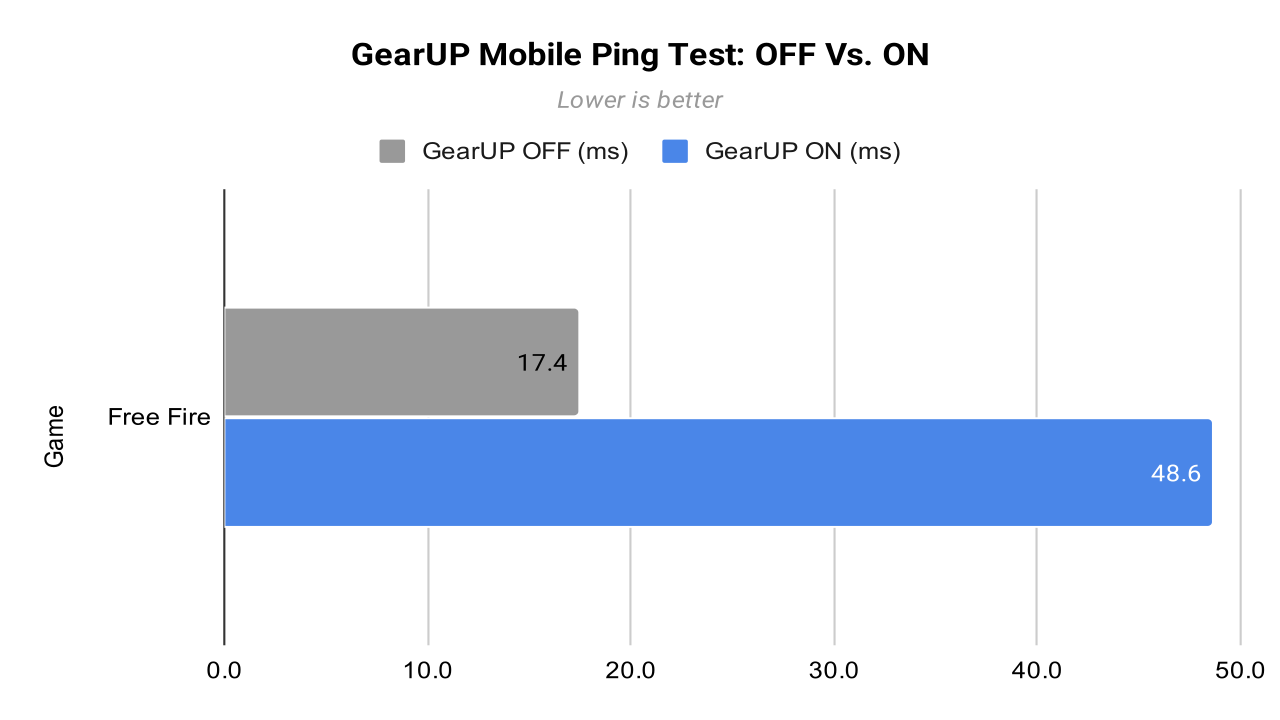
Free Fire produced by far the largest difference of the six-game test. Without GearUP, both sessions averaged 17.4 ms. With GearUP enabled, they averaged 48.5 ms and 48.7 ms, a combined 48.6 ms. That is an increase of 31.2 ms (+179%), or almost 2.8 times the original latency.
The individual readings confirm this was not an isolated spike. OFF readings stayed in the high teens, roughly 15 to 24 ms. With GearUP enabled, the median was about 50 ms, with a sampled range of roughly 35 to 51 ms.
Conclusion: In Free Fire, GearUP did not merely fail to help; it made the route substantially worse. This was the strongest negative result of the benchmark and shows why route optimizers must be tested game by game, since a route that works well for one server infrastructure does not automatically work for another.
Mobile Legends: Bang Bang
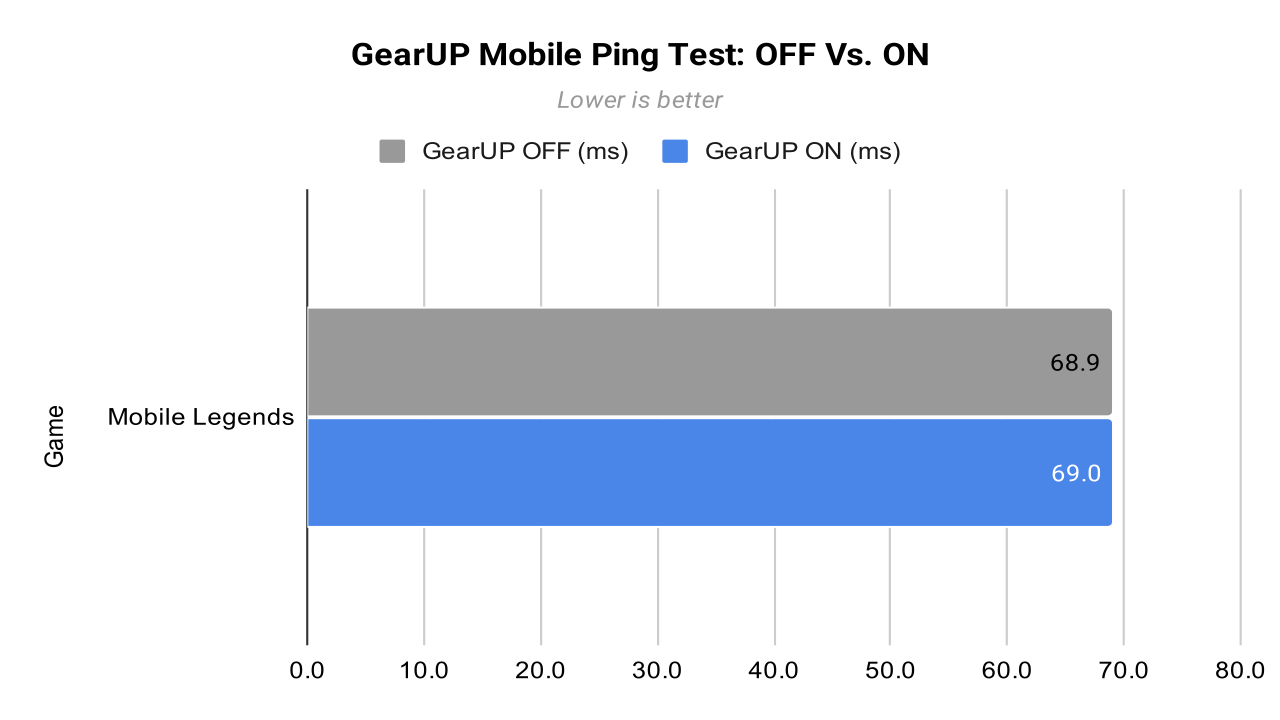
Mobile Legends: Bang Bang was the only game where GearUP made virtually no difference. The OFF sessions averaged 68.8 ms and 69.0 ms (combined 68.9 ms), while the ON sessions averaged 67.0 ms and 70.9 ms (combined 68.95 ms). The difference is about 0.05 ms, which is effectively zero.
This result also illustrates why repeated testing matters. The first GearUP session was slightly better than the OFF sessions, but the second was worse. Had I tested only the first run, I might have concluded that the booster reduced latency.
Conclusion: GearUP had no measurable effect on Mobile Legends latency in this test.
Call of Duty: Mobile
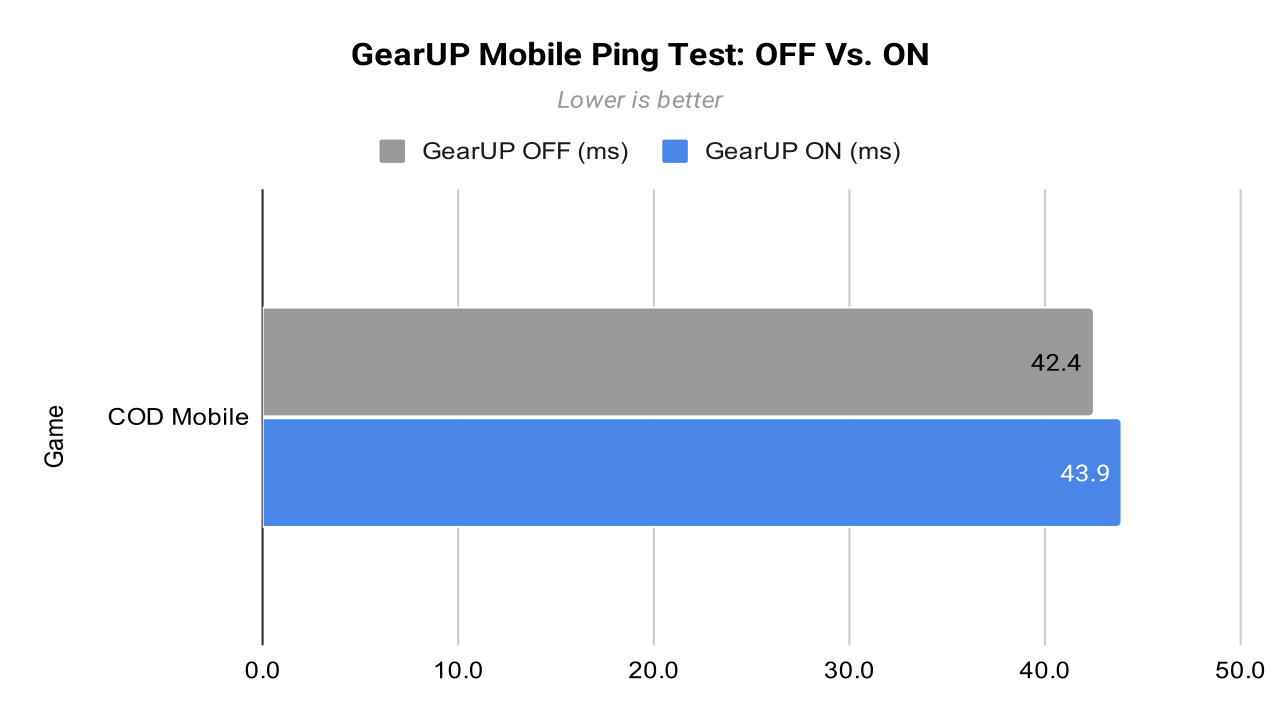
Without GearUP, the two sessions averaged 42.0 ms and 42.8 ms (combined 42.4 ms). With GearUP, they averaged 44.2 ms and 43.6 ms (combined 43.9 ms), an increase of 1.5 ms (+3.5%).
Sampled OFF readings ranged from about 40 to 46 ms, while GearUP readings ranged from about 40 to 50 ms, so the OFF sessions were slightly tighter.
Conclusion: An extra 1.5 ms is unlikely to be noticeable in gameplay. I classify this as no meaningful benefit rather than a serious degradation. With the normal connection already in the low-40 ms range, GearUP had little room to improve it.
Honor of Kings
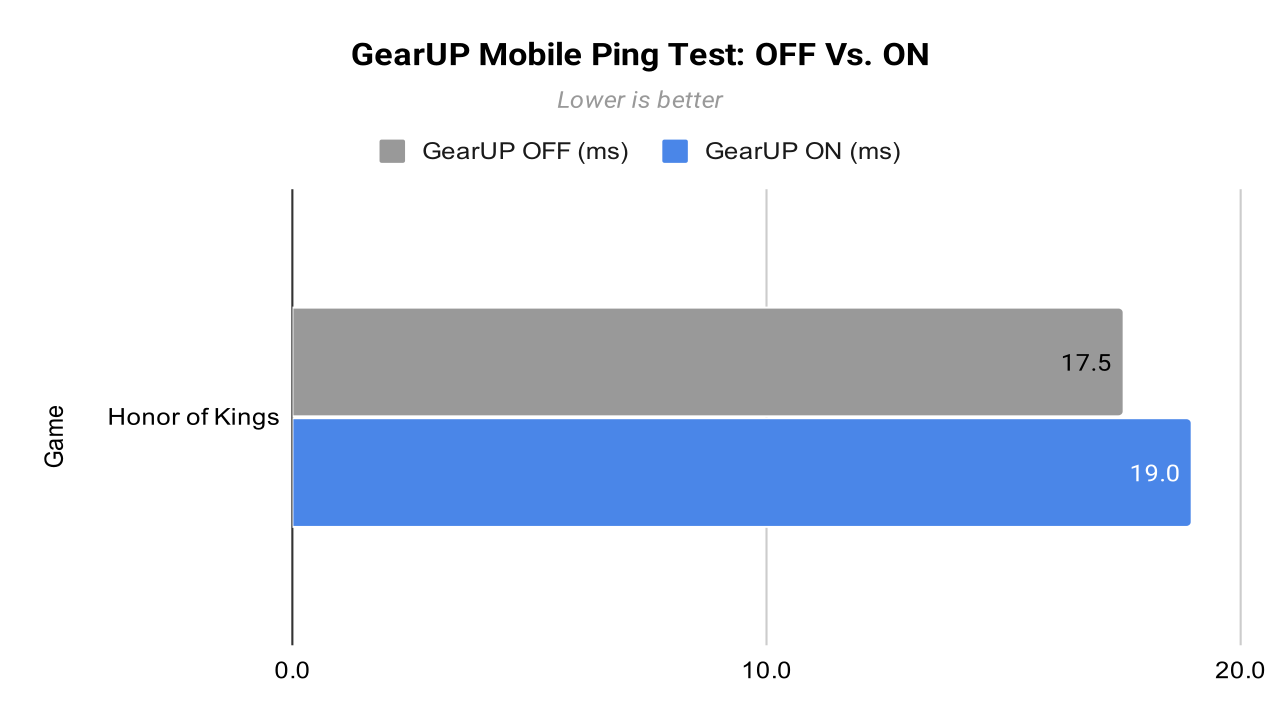
Honor of Kings had one of the lowest baselines in the test, alongside Free Fire. Without GearUP, the sessions averaged 17.9 ms and 17.1 ms (combined 17.5 ms). With GearUP, they averaged 19.1 ms and 18.8 ms (combined 18.95 ms), an increase of 1.45 ms (+8.3%).
The percentage looks larger than it is. Both connections operated at very low latency, and the shift from 17.5 ms to roughly 19 ms is unlikely to produce a perceptible difference. Both GearUP sessions still landed above the OFF average, suggesting the original route was already highly efficient.
Conclusion: GearUP slightly increased latency, but the difference is too small to matter much in practice.
Fortnite
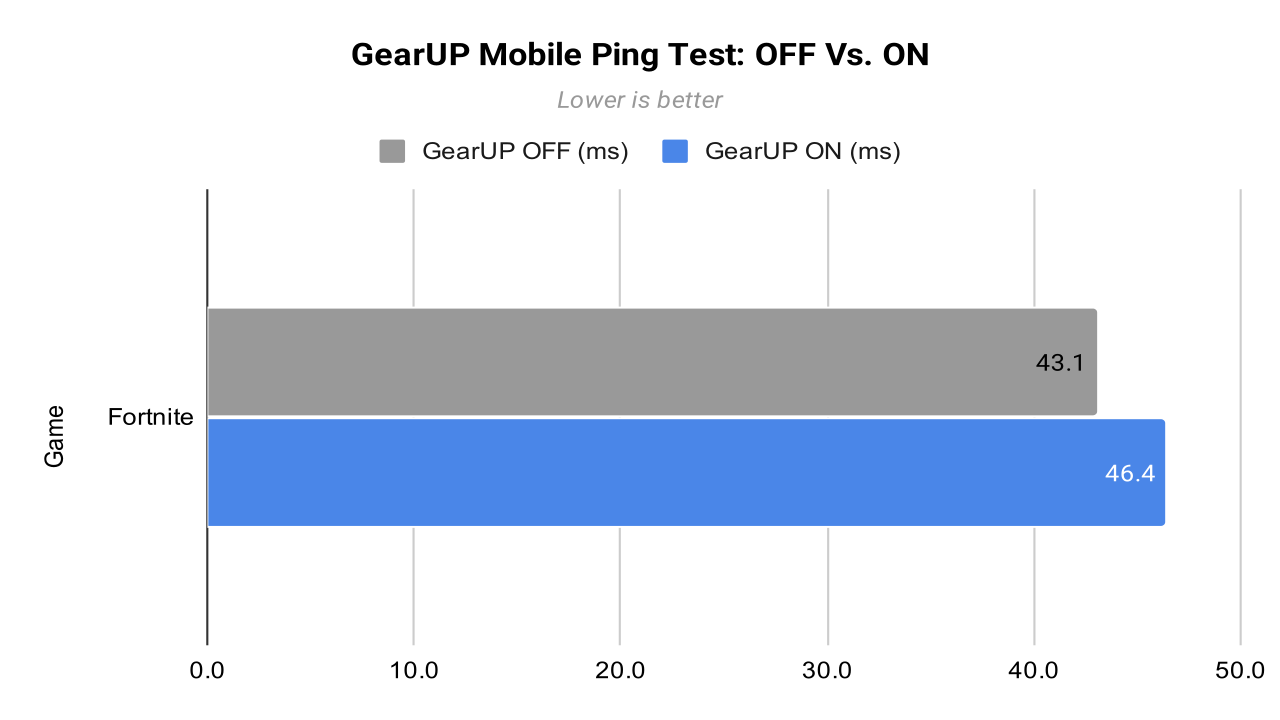
The two OFF sessions averaged 41.7 ms and 44.4 ms (combined 43.05 ms). With GearUP enabled, they averaged 47.7 ms and 45.1 ms (combined 46.4 ms), an increase of 3.35 ms (+7.8%).
Peaks were also higher with GearUP: OFF recordings reached about 58 ms at their highest sampled points, while one GearUP session reached about 67 ms. I found no indication that GearUP improved either the headline ping or the stability of the connection.
Conclusion: The difference is far smaller than in Free Fire but larger than in Call of Duty: Mobile or Honor of Kings. In this test, the normal connection provided the better route.
What the Six Games Show
Across all six games, GearUP did not reduce average ping in a single title. The results fall into three groups:
- No measurable change: Mobile Legends: Bang Bang (+0.05 ms).
- Small increases, likely imperceptible: Call of Duty: Mobile (+1.5 ms) and Honor of Kings (+1.45 ms).
- Clear increases: Fortnite (+3.35 ms), PUBG Mobile (+4.2 ms), and Free Fire (+31.2 ms), the last being a major outlier.
These results do not prove that GearUP will worsen every player’s connection. They show something narrower and more useful: GearUP was unable to find a better route than my ISP already provided for any of the six games under these conditions.
Route optimizers depend heavily on the route a user starts with. A player whose ISP has poor peering or inefficient routing may see a very different result. But on my connection, the data does not support the claim that simply enabling GearUP leads to lower ping.
The practical takeaway: test GearUP against your normal connection before paying for a subscription. Ignore the latency estimate inside the app, use the ping reported by the game itself, repeat the test more than once, and compare under identical conditions.
GearUP Mobile Cost
At the time of writing, GearUP’s official store lists a one-month GearUP Mobile membership for US$6.99. Pricing can vary by region, taxes, app store, promotions, and subscription length. GearUP also advertises a free trial on its official website.
The trial is particularly important for this kind of service. Unlike software that behaves the same for every customer, a network optimizer’s performance depends on your ISP and physical location. The best approach is to test it with the games and servers you actually play before committing to a longer plan.
Want to test it on your own connection? Use the code GCATALOGUE to unlock a free trial of GearUP Mobile and compare your in-game ping with the booster on and off.
Affiliate link. See the disclosure at the top of this article.
GearUP Booster Mobile Pros and Cons
Pros
- Easy to set up and use
- Supports a large number of popular mobile games
- Built specifically for gaming traffic rather than general VPN use
- Can potentially help when poor ISP routing is the main cause of high ping
- Makes it easy to try alternative routes without manual configuration
- Free trial lets you check whether your own connection benefits before paying
Cons
- Lower ping is not guaranteed
- In my tests, it did not reduce average ping in any of the six games
- Ping increased noticeably in PUBG Mobile and Fortnite, and dramatically in Free Fire (+179%)
- Results depend heavily on your ISP, location, game server, and existing route
- Small gains or losses may be too minor to notice in real gameplay
- Does not improve FPS or fix hardware-related performance issues
Who Should Use GearUP Mobile?
GearUP makes the most sense for players who experience unusually high ping, unstable latency, packet loss, or poor connections to servers outside their immediate region. If your ISP sends game traffic through an inefficient route, replacing that path can make a meaningful difference.
It is much less useful when your connection is already stable and well routed. In that case, GearUP cannot remove the geographic distance to the server, and it may even add latency. That is why two people playing the same game can have completely different experiences with the same booster.
Is GearUP Booster Mobile Worth It?
GearUP Booster Mobile is a legitimate network routing tool, but whether it is worth paying for depends on the problem you are trying to solve. It cannot raise your FPS, compensate for weak hardware, or eliminate latency caused by distance. What it can potentially improve is the route between your connection and the game server.
In my six-game test, the effect was negative in five games, neutral in one, and positive in none.
- Best result: Mobile Legends: Bang Bang, where average latency was effectively unchanged (68.9 ms to 68.95 ms).
- Worst result: Free Fire, where average latency rose from 17.4 ms to 48.6 ms.
- Overall: across all six games, average latency rose from 34.9 ms to 41.8 ms (about +7.0 ms, or +20%). Excluding Free Fire, the increase was about +2.1 ms (+5.5%).
These numbers say more than a simple “it works” or “it doesn’t.” GearUP helps only when the alternative route it provides is better than the one your ISP already uses. If your default route is excellent, GearUP offers little and can be slower. If your default route is inefficient or unstable, it may reduce latency and improve consistency.
My recommendation: use the free trial (code GCATALOGUE), test the games you actually play, and compare real in-game ping with GearUP enabled and disabled. If you do not see a clear improvement, there is no reason to pay. On my connection, I would not.
FAQ (Frequently Asked Questions)
Does GearUP Booster really reduce ping?
It can, but it is not guaranteed. GearUP changes the network route used to reach the game server. If that route is better than the one provided by your ISP, ping may decrease. In my tests, GearUP did not reduce average ping in any of the six games, because my ISP’s default routes were already efficient.
Is GearUP a VPN?
GearUP Mobile uses the device’s VPN functionality to route gaming traffic, but it is designed as a gaming network optimizer rather than a traditional general-purpose VPN.
Does GearUP improve FPS?
No. GearUP optimizes network routing. It does not increase your phone or tablet’s GPU or CPU performance.
Can GearUP make ping worse?
Yes. If the GearUP route is longer or less efficient than your ISP’s existing route, latency can stay the same or increase. In my tests, average ping rose in five of six games, most dramatically in Free Fire, from 17.4 ms to 48.6 ms. This is why testing each game individually is important.
Does GearUP work with Wi-Fi?
Yes. All of the primary tests in this review were performed over a 5 GHz Wi-Fi 6 connection.
Is GearUP free?
GearUP advertises a free trial, but continued access to its premium mobile boosting features requires a membership.
What games does GearUP Mobile support?
GearUP advertises support for thousands of games. In this review, I specifically tested PUBG Mobile, Mobile Legends: Bang Bang, Free Fire, Call of Duty: Mobile, Honor of Kings, and Fortnite.
