



Table of Contents
If you’re looking for an antivirus that magically boosts gaming performance, you’re looking for the wrong thing.
No antivirus software is going to increase your FPS. At best, some security solutions simply introduce less gaming overhead than Windows Defender while still offering additional protection features.
What actually matters is how much performance impact it has while gaming — especially compared to Microsoft Defender, since Defender is already enabled by default on most gaming PCs.
That’s what this benchmark was designed to test.
Instead of running synthetic tests or using generic “PC optimization” claims, I tested McAfee in real games using repeated performance captures, frame time analysis, and aggregated data.
The goal was to measure real-world gaming impact by comparing McAfee disabled versus enabled, while analyzing average FPS, 1% lows, frame time stability, CPU overhead, and overall frame delivery consistency during gameplay.
To keep the results consistent, every game was tested multiple times using CapFrameX aggregation.
Test System and Methodology
PC Specifications
The benchmarks were performed on the gaming system listed below. A full breakdown of the setup, including BIOS settings, cooling configuration, storage layout, drivers, Windows tweaks, and peripherals used during testing, can be found on my dedicated PC setup page.
- Intel Core i7-11700K
- NVIDIA GeForce RTX 3080 Ti
- 32GB DDR4-3200
- Windows 11
- SSD storage
Tools Used
- CapFrameX for benchmark capture and frame time aggregation
- RTSS for the real-time performance overlay
- NVIDIA ShadowPlay for gameplay recording
- OBS for gameplay recording
Testing Methodology
The methodology used in this test was designed to minimize random variation and background inconsistencies.
Every game was benchmarked in two scenarios: McAfee completely disabled, and McAfee enabled with real-time protection active.
The antivirus used throughout testing was McAfee Total Protection. To avoid introducing unnecessary variables, only the firewall and real-time scanning features remained enabled during testing, while optional modules and additional features were intentionally disabled.
For each scenario, three benchmark runs were performed and then aggregated using CapFrameX. Outlier runs were removed whenever a testing run showed clearly abnormal frame pacing behavior or inconsistent percentile results. Integrated benchmarks were used whenever possible to improve repeatability between runs.
All games were installed and benchmarked first with McAfee disabled. After completing the baseline runs, McAfee Total Protection was installed and the system was restarted before beginning the second round of testing with real-time protection enabled.
Once the software was active, the antivirus was allowed to finish its initial setup and background activity before benchmarking started. Background applications were closed during testing, no downloads were active, and browser tabs were kept closed to reduce unnecessary variance.
This matters because antivirus software can behave very differently immediately after installation, especially while downloading definitions, scanning files for the first time, or initializing background services. Running benchmarks too early can easily produce misleading measurements.
The goal here was to measure realistic gaming impact during normal day-to-day usage rather than worst-case installation behavior.
Understanding the Benchmark Metrics
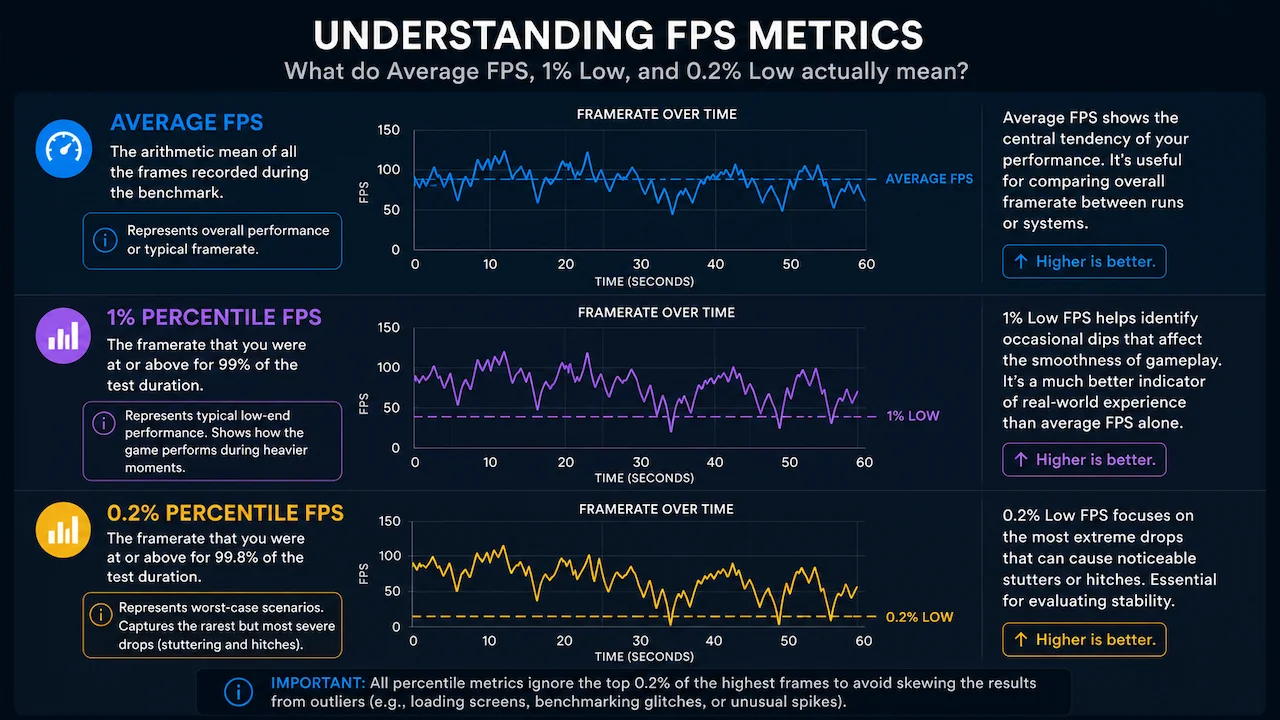
Before analyzing the benchmark results, it’s important to understand what each FPS metric actually represents. Average FPS only tells part of the story, and relying on it alone can hide frame pacing issues, stuttering, and inconsistent gameplay behavior.
That’s why this benchmark also focuses on lower percentile metrics such as 1% low FPS and 0.2% low FPS. These values provide a much clearer picture of real-world smoothness, especially during heavier scenes, traversal, asset streaming, or sudden CPU spikes caused by background activity.
In many cases, lower percentile frame rates are far more useful for evaluating the actual gaming experience than average FPS alone.
Benchmark Results
Shadow of the Tomb Raider
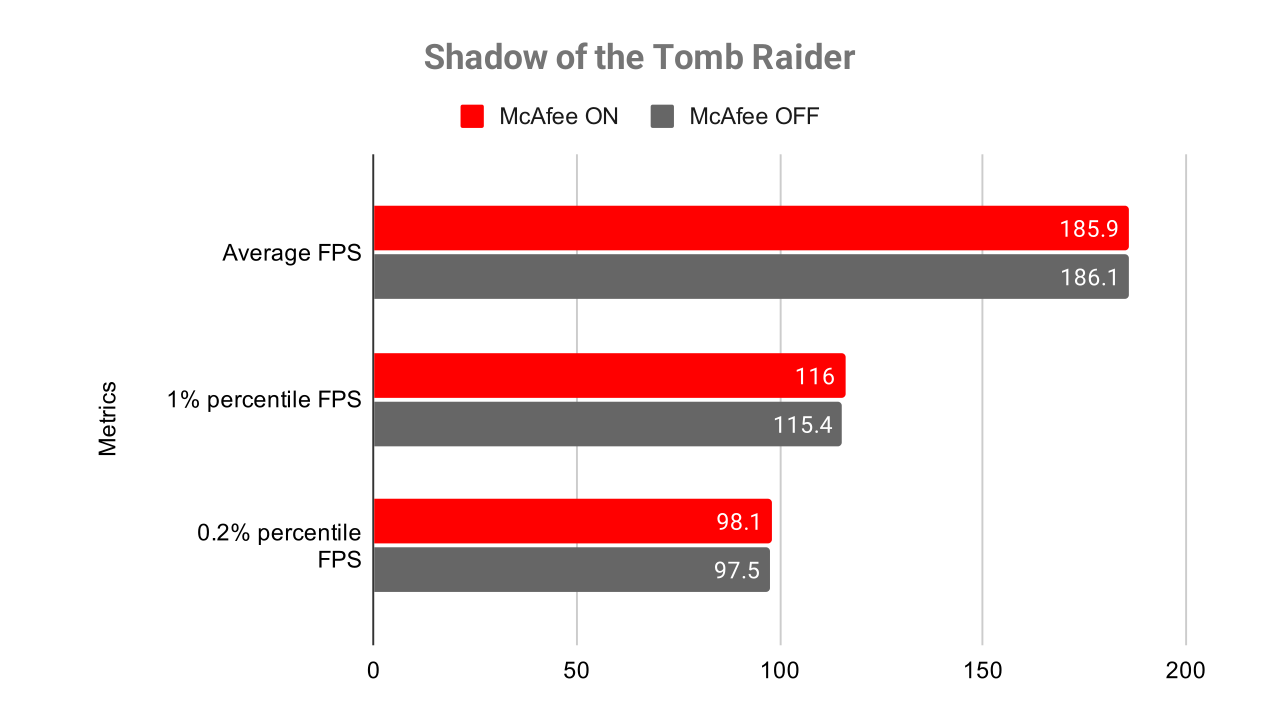
Shadow of the Tomb Raider ended up delivering one of the most stable results in the entire testing lineup. After aggregating multiple runs through CapFrameX and removing inconsistent outliers from earlier tests, the final numbers showed virtually no meaningful difference between McAfee enabled and disabled.
Average FPS remained almost identical across both scenarios, while the lower percentile metrics stayed well within margin-of-error territory. Interestingly, McAfee ON even showed slightly higher 1% and 0.2% percentile values in the final aggregate, although the difference is small enough that it should not be interpreted as an actual gaming advantage.
This was also one of the clearest examples of why repeated benchmark runs matter. Some earlier captures initially suggested that the software might be causing significant frame pacing issues, but after retesting and stabilizing the dataset, the benchmark became far more consistent. In real gameplay, the experience felt effectively identical between both scenarios.
For CPU-heavy games with complex streaming behavior, relying on a single benchmark pass can produce extremely misleading data, especially right after installing antivirus software or during background initialization activity.
Rainbow Six Siege
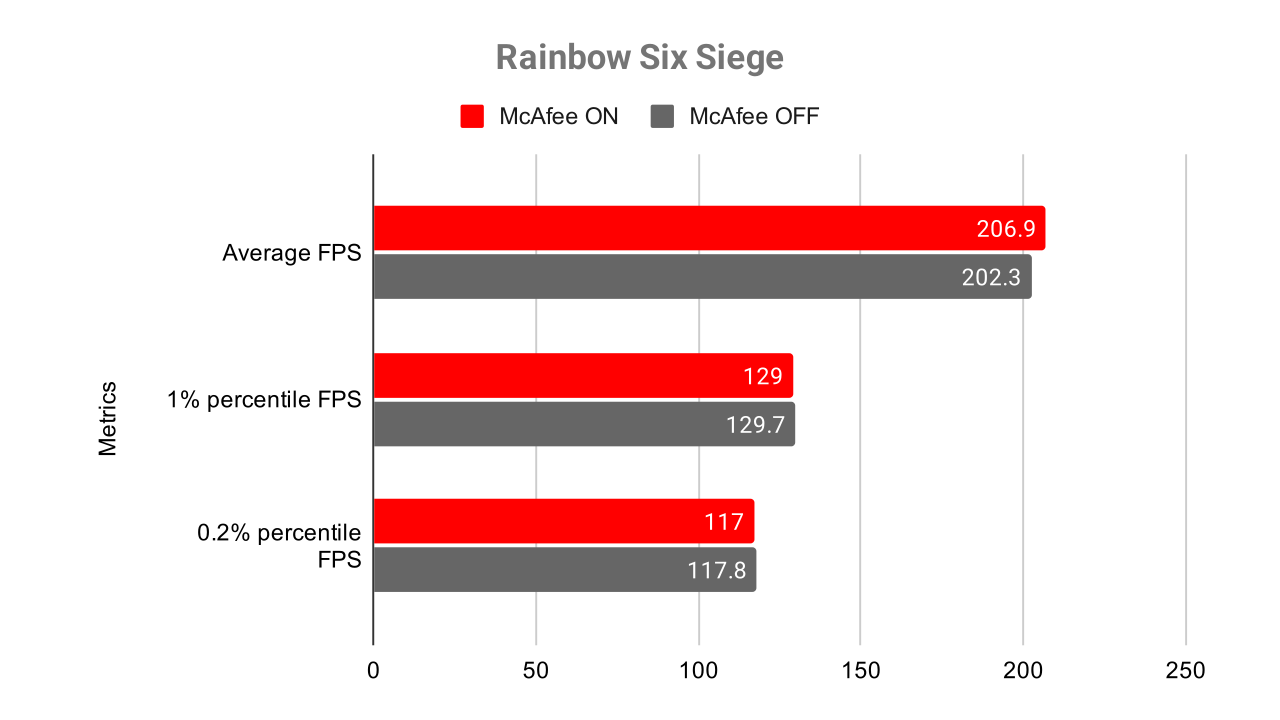
Rainbow Six Siege produced some of the cleanest and most repeatable results during testing, making it particularly useful for identifying smaller responsiveness differences.
Because Siege can run at extremely high frame rates on competitive settings, even minor background CPU overhead becomes easier to detect in lower percentile frame times. Despite that, McAfee Total Protection showed very little measurable impact on overall performance once the benchmark runs were aggregated properly.
Average FPS remained extremely close between both scenarios, while frame pacing stayed largely consistent throughout the benchmark. Lower percentile metrics showed only minor variation, and none of the differences observed during testing were large enough to meaningfully affect gameplay responsiveness or competitive play.
This was another good example of why methodology matters more than raw screenshots of FPS counters. Without repeated benchmark passes and aggregation, small random fluctuations can easily look larger than they really are.
Forza Horizon 4
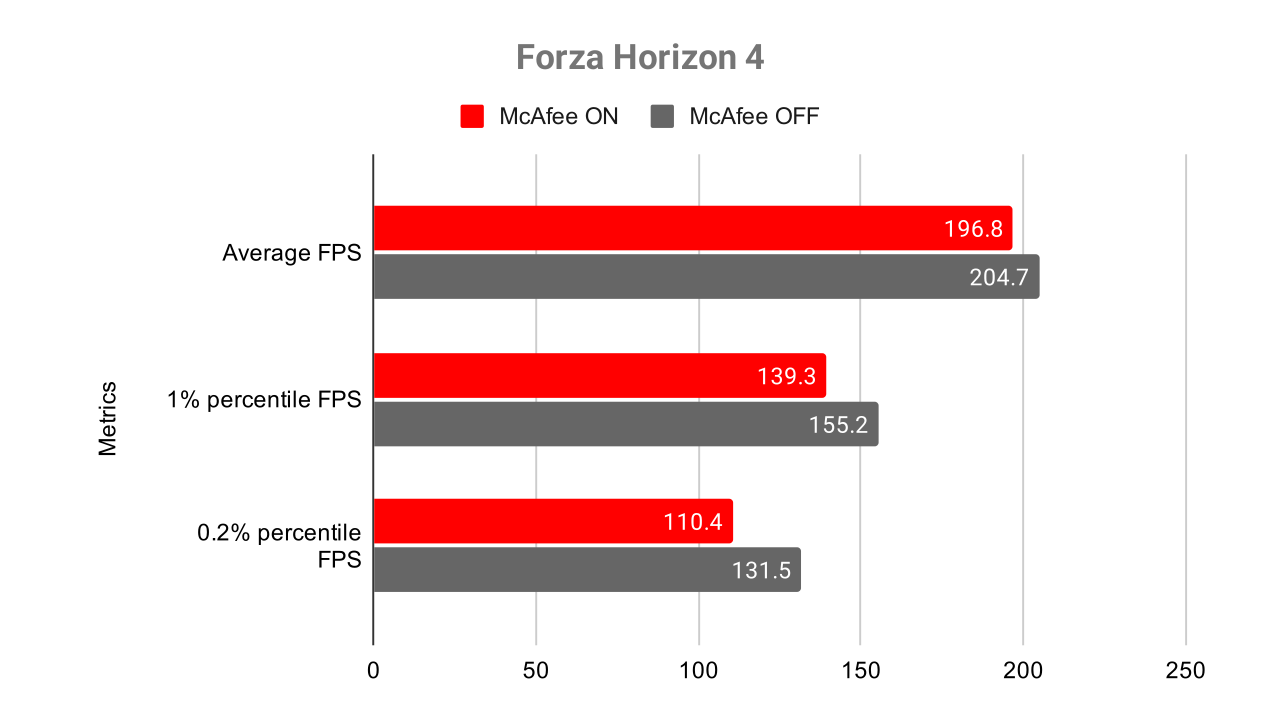
Forza Horizon 4 ended up being one of the most difficult games to benchmark consistently throughout the testing process.
Several early runs produced unusually inconsistent percentile results, especially during heavier streaming sections and scene transitions. Some captures behaved like obvious outliers and had to be discarded entirely before the final aggregation process.
After cleaning the dataset and rerunning unstable passes, the benchmark became significantly more reliable. The final aggregated results showed that McAfee introduced a small but measurable reduction in lower percentile performance, while average FPS remained relatively close between both scenarios.
In practice, the most noticeable difference was not average framerate itself but occasional frame pacing inconsistencies during heavier traversal sections. These brief irregularities were much easier to identify through 1% and 0.2% percentile metrics than through raw average FPS alone.
This was one of the strongest reminders that average FPS is often the least important metric when evaluating gaming smoothness. A game can maintain nearly identical average framerates while still feeling less consistent during actual gameplay.
Deus Ex: Mankind Divided
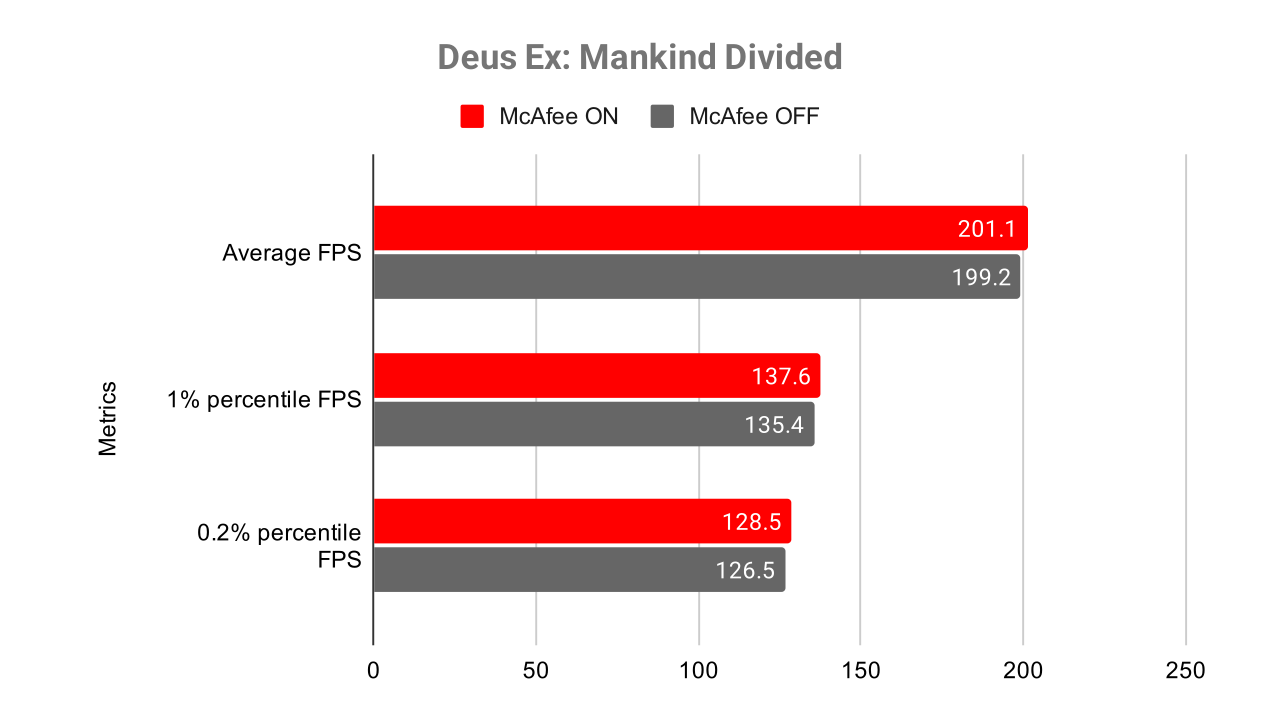
Deus Ex: Mankind Divided remained one of the better titles in this benchmark suite for exposing CPU-side overhead and frame pacing inconsistencies caused by background activity.
The benchmark itself behaved relatively consistently across multiple runs, and the final aggregated results showed only modest differences in average FPS between McAfee enabled and disabled. However, lower percentile frame rates still revealed small changes in frame pacing behavior during heavier scenes and denser benchmark segments.
These differences were not severe enough to significantly affect playability, but they were measurable through frame time analysis and lower percentile metrics. This is exactly where antivirus overhead tends to become more visible in real-world gaming workloads.
Like several of the other games tested here, Deus Ex reinforced the idea that average FPS alone rarely tells the full story. Even when overall framerate appears stable, lower percentile performance can still reveal background interruptions, CPU scheduling overhead, and small inconsistencies in frame delivery.
Does McAfee Lower FPS?
The short answer is:
Yes — but the impact depends heavily on the game and workload.
In most scenarios, the largest differences appeared in lower percentile frame rates and overall frame time consistency rather than raw average FPS.
Average FPS was usually less affected.
This is important because many antivirus benchmarks focus only on average FPS, which often hides stuttering and frame pacing problems.
Real-world smoothness matters more than raw averages.
McAfee vs Windows Defender for Gaming
This is probably the most important comparison.
Most gamers already use Windows Defender by default, so the real question is not:
“Does antivirus reduce FPS?”
The real question is:
“How much additional overhead does this antivirus introduce compared to Defender?”
Based on these tests, McAfee can introduce measurable overhead in certain games, particularly in lower percentile frame rates. The results also varied significantly depending on CPU load, background streaming behavior, and the game engine itself.
However, the impact was not universally catastrophic.
Some games showed relatively minor differences after aggregation and outlier filtering.
Final Verdict – Should Gamers Use McAfee?
If your only goal is maximum competitive frame consistency with the absolute lowest possible overhead, Windows Defender remains difficult to beat simply because it is deeply integrated into Windows.
However, that does not automatically make third-party antivirus software unusable for gaming.
The real answer depends on how sensitive you are to frame pacing issues, the types of games you play, whether you value additional security features, and how aggressively the antivirus behaves in the background during gameplay.
If you still want additional protection beyond Windows Defender, especially for general browsing, downloads, and day-to-day security, you can check out McAfee Total Protection through the discounted offer available in the banner below.

FAQ (Frequently Asked Question)
Is McAfee a virus?
No. McAfee is a legitimate cybersecurity company and its antivirus software is safe to install when downloaded from the official website. Some users dislike the software because of pop-ups, bundled trials, or system impact on older PCs, but McAfee itself is not malware.
Is McAfee good?
McAfee has improved significantly over the last few years. Modern versions offer solid malware protection, a built-in firewall, VPN access, identity monitoring, and additional security tools. In gaming scenarios, the overall FPS impact was relatively small in this test, although lower percentile frame rates could occasionally be affected.
Is McAfee a good antivirus?
For most users, yes. McAfee provides strong real-time protection and a large feature set compared to basic antivirus solutions. However, whether it is the best antivirus for gaming depends on how sensitive you are to background resource usage and frame time consistency.
Is McAfee safe?
Yes. McAfee is considered safe and legitimate antivirus software. As with any security suite, it should only be downloaded from official or trusted sources to avoid fake installers or modified versions.
Is McAfee worth it?
That depends on your needs. If you only want basic antivirus protection, Windows Defender is already very capable. However, McAfee can be worth it for users who want additional security layers such as identity protection, VPN access, scam detection, and broader online protection features.
Is McAfee free?
McAfee does offer limited free trials occasionally, but most features require a paid subscription. The full protection suite, including real-time protection and additional privacy tools, is part of the premium plans.
Is McAfee legit?
Yes. McAfee is one of the oldest and most established antivirus brands in the cybersecurity industry and is used by millions of users worldwide.
Is McAfee malware?
No. McAfee itself is not malware. Some people confuse aggressive notifications or preinstalled OEM versions with malicious behavior, but the software is legitimate antivirus protection.
Is McAfee bad for gaming?
Not necessarily. Based on the benchmark data collected in this article, McAfee did not heavily reduce average FPS in most games. The biggest impact appeared in lower percentile frame rates and frame pacing consistency during some test scenarios. In normal gaming sessions, many players would likely not notice a major difference.
