


Table of Contents
LagoFast is a game booster designed to reduce lag, improve connection stability, and make online games feel smoother by optimizing the route between your device and the game server. On paper, that sounds useful, especially for competitive games where ping spikes, packet loss, and unstable routing can make a match feel worse than it should.
But tools like this are not magic. A game booster cannot fix a bad PC, overloaded Wi-Fi, weak hardware, or a broken internet connection. What it can potentially do is improve routing, reduce unstable latency, and make the connection more consistent in specific games and regions.
If you’re deciding between different gaming route optimizers, we’ve also reviewed ExitLag, GearUP Booster, and WTFast using similar testing methods.
In this LagoFast review, I tested the tool with online games such as CS2, Apex Legends, Valorant, Fortnite, Rainbow Six Siege, Overwatch 2, and Call of Duty / Warzone to see whether it actually makes a difference in real gameplay. The focus here is not on marketing claims, but on practical results: ping, stability, packet loss, ease of use, pricing, and whether LagoFast is worth paying for.
What Is LagoFast?
LagoFast is a game booster focused on reducing lag, lowering ping, and improving connection stability in online games. Instead of working like a traditional FPS booster that mainly changes graphics settings or system resources, LagoFast is mostly built around network optimization. Its goal is to improve the route between your device and the game server, helping reduce latency, ping spikes, packet loss, and unstable connections.
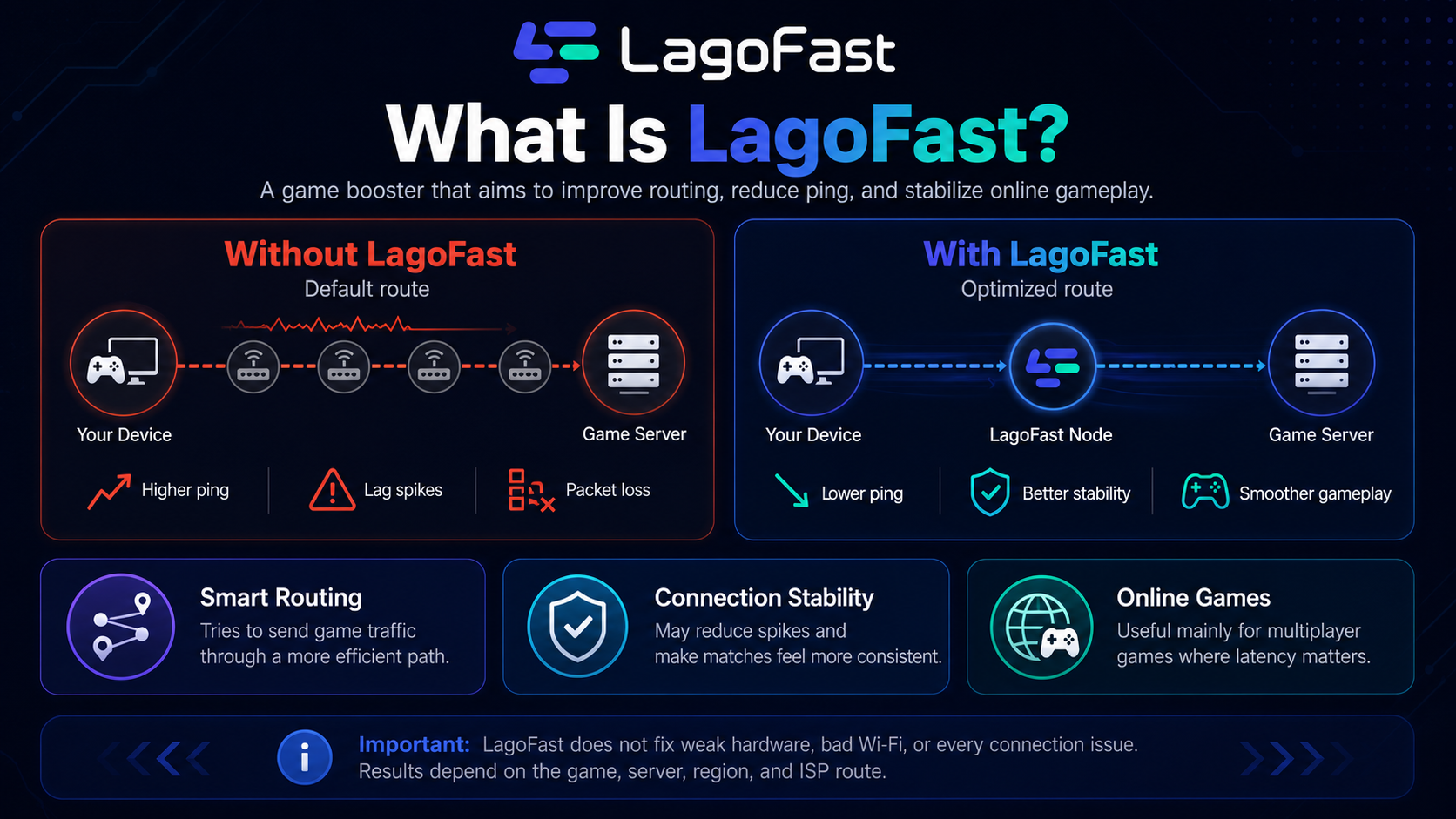
The tool is designed for players who experience high ping, unstable routing, or lag in online multiplayer games. LagoFast officially describes itself as a game route optimization product made to solve problems such as game lag and high ping for global players. It also promotes support for PC, mobile, and console gaming, with features such as intelligent routing, multipath connection, automatic server selection, and support for more than 2,000 games.
In simple terms, LagoFast tries to find a better path for your game traffic. If your normal internet route to a game server is inefficient, congested, or unstable, a tool like LagoFast may help by routing your connection through optimized nodes. This does not guarantee lower ping in every game, but it can make a noticeable difference when the original route from your internet provider is poor.
That distinction is important. LagoFast is not a magic fix for every performance problem. It will not turn weak hardware into a high-end gaming PC, and it will not solve local issues such as overloaded Wi-Fi, background downloads, bad drivers, or an unstable home network. Its real value depends on whether it can provide a better network route for the specific game, region, and server you are playing on.
How LagoFast Works
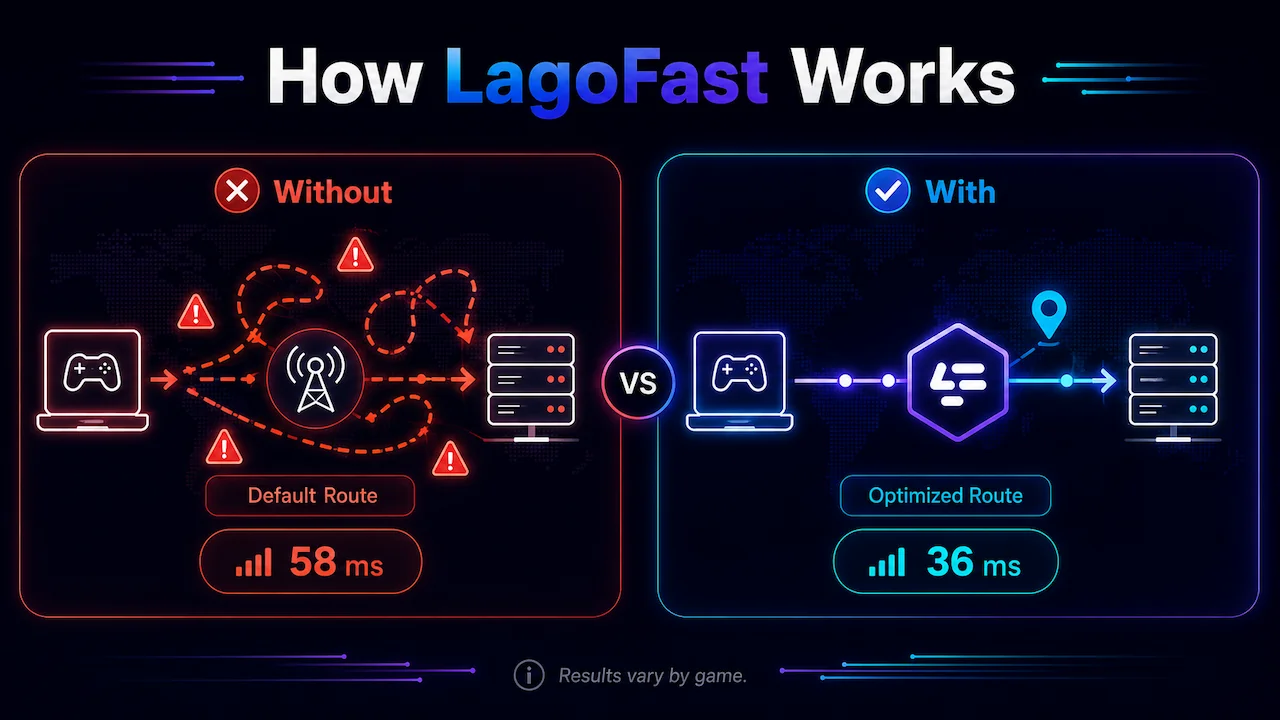
LagoFast works by routing your game connection through optimized network paths instead of relying only on the default route chosen by your internet service provider. In normal online gaming, your connection does not always take the shortest or most stable path to the game server. Sometimes the route includes congested hops, inefficient routing, or unstable nodes that can increase ping, cause latency spikes, or create packet loss.
The idea behind LagoFast is to detect a better route between your device and the game server. When you choose a game and enable the boost, LagoFast attempts to connect your game traffic through its own optimized nodes. This can help reduce latency when your default ISP route is inefficient, especially in games with distant servers, poor regional routing, or inconsistent connection paths.
LagoFast also promotes features such as multipath connection and real-time automatic server selection. In practice, this means the tool can use more than one route or select a better server path automatically instead of forcing the player to manually test every option. LagoFast describes its product as a game route optimization tool built to address lag and high ping, and its own support material also refers to AI-optimized primary routes with backup routing options.
This is different from a regular VPN. A VPN usually focuses on privacy, location masking, or general traffic routing. LagoFast is specifically aimed at game traffic, with features focused on routing, latency, stability, and supported game profiles. The company also promotes smart multi-path technology and real-time network optimization in its mobile app listings.
However, performance depends heavily on the game, server, region, and your ISP route. If your default connection is already efficient, LagoFast may only reduce ping slightly. If your route is unstable or congested, the difference can be much more noticeable. That is why the most useful way to judge LagoFast is not by its marketing claims, but by testing it in real games and comparing ping, packet loss, and stability before and after enabling the boost.
LagoFast Main Features
LagoFast includes several features built around game connection optimization, ease of use, and cross-platform support. The most important ones are:
- Game route optimization: LagoFast attempts to find a better route between your device and the game server, which may help reduce ping and unstable latency.
- Automatic server selection: The tool can automatically recommend or select an optimized server route instead of requiring the user to test every option manually.
- Multipath connection: LagoFast promotes multipath connection technology, which is designed to improve stability by using optimized network paths for game traffic.
- Support for many online games: LagoFast supports a large library of online games, including competitive shooters, battle royale games, MMOs, MOBAs, and other multiplayer titles.
- Ping and latency display: The app shows connection information before boosting, helping users compare routes and check whether the optimized path looks better.
- PC, mobile, and console support: LagoFast is available for different types of players, including PC users, mobile players, and console gamers.
- One-click boost: The interface is designed to let users select a game and activate the optimization quickly, without needing advanced network knowledge.
- Easy Lobby feature: LagoFast includes an Easy Lobby feature for Call of Duty titles such as Warzone, Modern Warfare, and Black Ops. This feature is designed to help players connect to regions or server locations that may result in easier matchmaking, while still trying to keep the connection playable. It is a game-specific feature and should not be confused with LagoFast’s main ping optimization tools.
- Extra game tools: Depending on the game and platform, LagoFast may also include tools such as server selection, FPS-related options, and access to game-specific optimization pages.
These features make LagoFast more specialized than a regular VPN. The main purpose is not general privacy or location masking, but improving game routing, reducing connection instability, and making online gameplay feel more consistent when the default route is poor.
Interface and Ease of Use
LagoFast is fairly simple to use, even if you have never used a game booster before. The app is built around a straightforward process: search for the game, select it, choose the available route or server option, and start the boost. For most players, this is easier than manually changing DNS settings, testing VPN routes, or troubleshooting network paths through command-line tools.
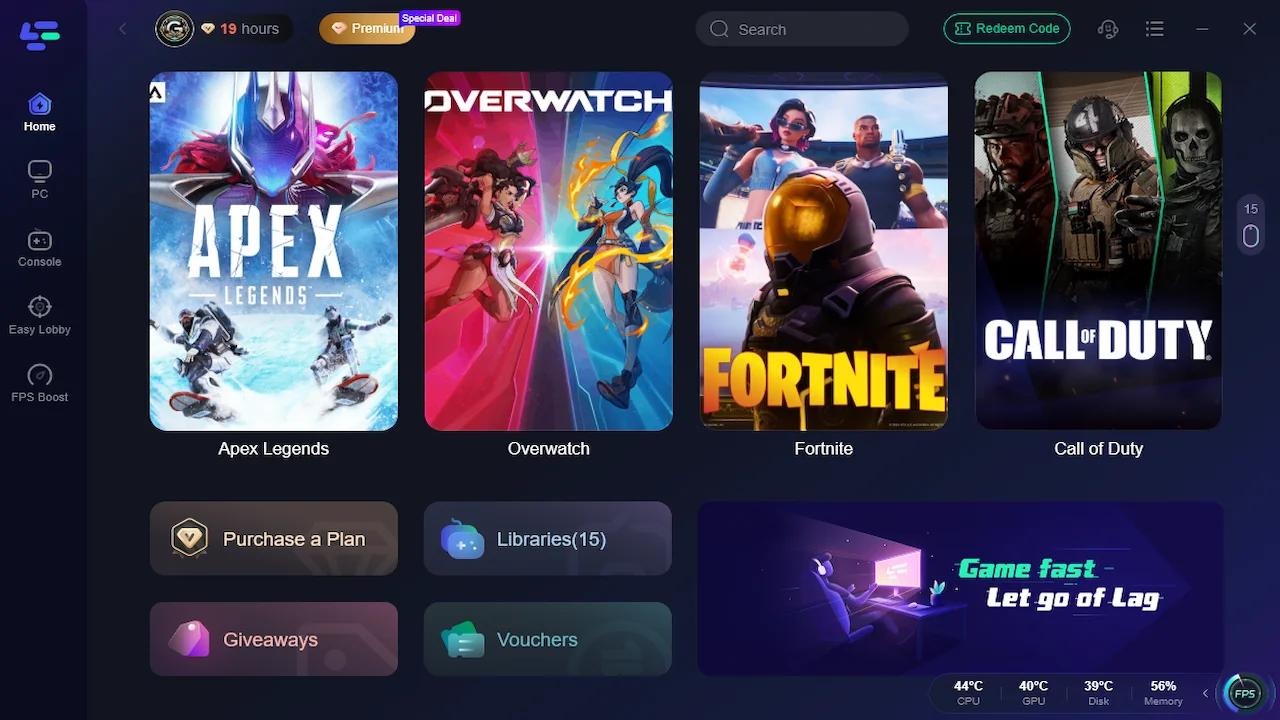
The main dashboard is focused on game selection and connection optimization. Once a game is selected, LagoFast shows connection-related information such as the selected route, estimated ping, and optimization status. This makes the tool easy to understand because the user does not need to deal with complex networking terms before starting a test.
During my use, the setup process was simple enough. The app did not require advanced configuration to start testing games like CS2, Valorant, Apex Legends, Fortnite, Rainbow Six Siege, Overwatch 2, and Warzone. In most cases, the process was just selecting the game, enabling the boost, launching the game, and checking the in-game ping overlay.
That said, LagoFast is still not completely “set and forget.” To get useful data, you still need to test it properly. The best route can vary depending on the game, region, server, and time of day. A route that works well in Warzone may not produce the same improvement in Fortnite or CS2. Because of that, players should compare LagoFast enabled and disabled instead of assuming the optimized route is always better.
In day-to-day use, the interface is one of LagoFast’s stronger points. It is simple enough for casual players, but still gives enough connection information to make basic comparisons. The app is not perfect, and performance depends heavily on the game and network route, but the user experience is much easier than manually diagnosing ping, packet loss, and routing problems.
Testing Methodology
For this LagoFast review, I tested the tool using a wired internet connection instead of Wi-Fi. The connection used for the test was an 800 Mbps internet plan connected through an Ethernet cable, which helped reduce local network interference and made the results more reliable than testing over wireless.
The games were tested at different times of the day to reflect more realistic usage conditions. This is important because online game performance can vary depending on server load, regional routing, ISP traffic, and matchmaking conditions. Because of that, the numbers should be viewed as real-world gameplay data rather than a controlled laboratory benchmark.
Each game was tested with LagoFast disabled and then tested again with LagoFast enabled. The comparison focused on average ping, visible latency stability, and packet loss when available through the in-game overlay. The main goal was to see whether LagoFast could reduce ping or make the connection feel more stable during actual gameplay.
For the ping comparison, I recorded gameplay footage and sampled the visible in-game ping values at regular intervals. The final chart uses rounded ping values for readability, while the improvement percentages were calculated from the original sampled averages. Since the data was collected from gameplay footage and in-game overlays, the numbers should be treated as approximate but still useful for comparing the before-and-after results.
The tested games included CS2, Valorant, Rainbow Six Siege, Fortnite, Apex Legends, Overwatch 2, and Call of Duty / Warzone. This selection was chosen to cover different types of online games, including tactical shooters, battle royale games, hero shooters, and competitive multiplayer titles where ping and connection stability can directly affect the gameplay experience.
LagoFast Ping Test Results
After testing LagoFast across multiple online games, the data showed that the tool can reduce ping, but the gains were not identical in every title. Some games showed a clear and consistent drop in latency, while others only had a small reduction compared to the default connection.
The chart below compares the average ping recorded with LagoFast disabled and enabled. Lower values are better, since lower ping usually means less delay between the player’s actions and the game server’s response.
It is also important to note that these numbers are based on real gameplay footage, not synthetic benchmarks. Ping values were sampled from the in-game overlays, rounded to the nearest millisecond for readability, and then compared between both test conditions.
Below, each game is analyzed individually to show where LagoFast made the biggest difference, where the improvement was more modest, and whether the connection appeared stable during gameplay.
Counter-Strike 2
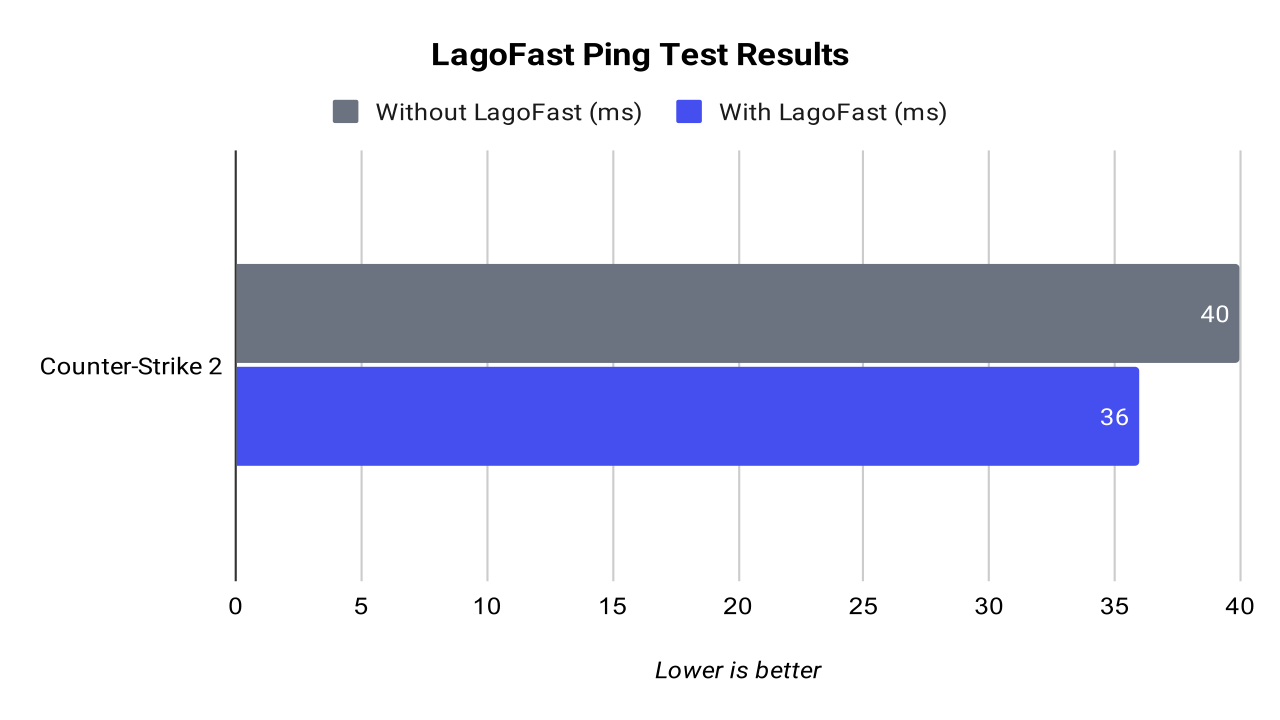
In CS2, LagoFast produced a small but measurable improvement. Without LagoFast, the average ping was around 40 ms. With LagoFast enabled, the average dropped to around 36 ms, which represents a 9.4% improvement based on the sampled data.
The difference was not dramatic, but it was consistent. CS2 was already running with a relatively stable connection, so LagoFast did not completely change the experience. However, the lower average ping still shows that the optimized route had a positive effect. Packet loss stayed mostly at 0.0%, although the CS2 overlay showed occasional “miss” readings during the test.
In short, CS2 showed a modest but clean improvement. LagoFast helped reduce latency slightly, but this was not one of the strongest findings in the review.
Valorant
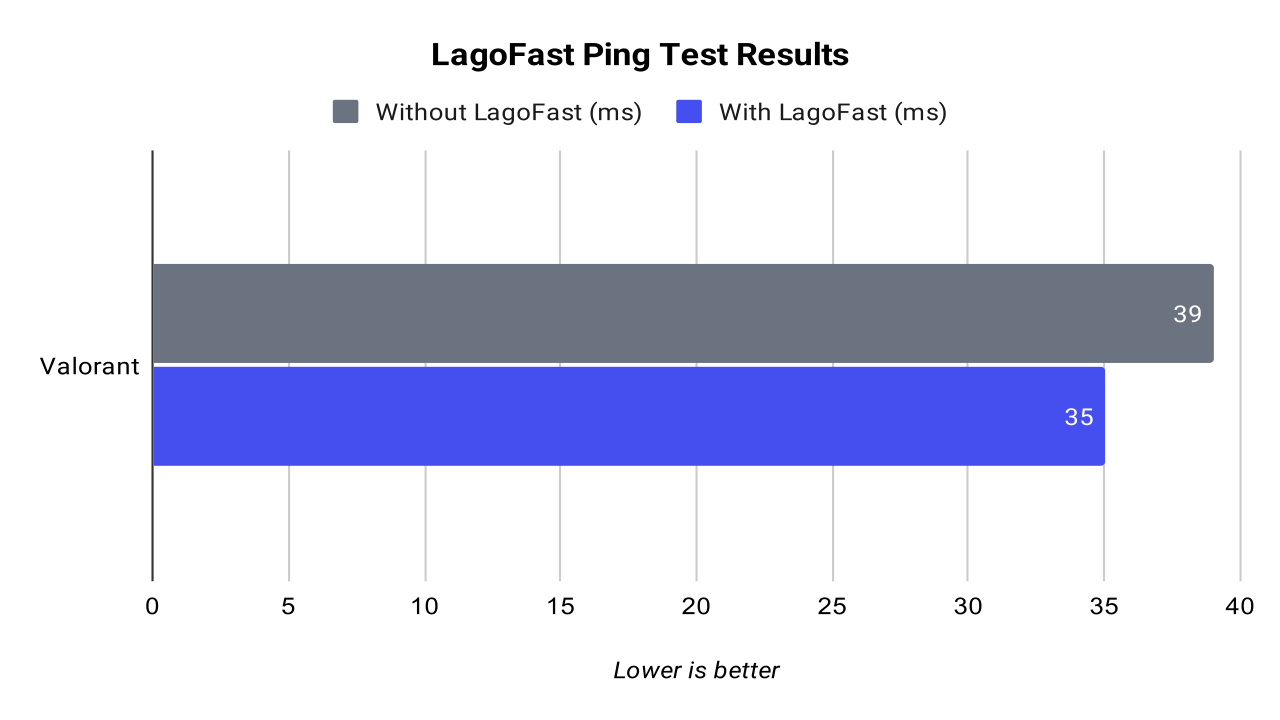
Valorant also showed a small and consistent improvement with LagoFast enabled. Without LagoFast, the average Network RTT was around 39 ms. With LagoFast, the average dropped to around 35 ms, resulting in a 9.1% improvement.
This is a useful result, but not a massive one. Valorant already had a stable connection during the test, so the difference was mostly visible in the average ping rather than in a dramatic change in gameplay feel. Packet loss remained at 0% for most of the test, although one visible reading without LagoFast briefly showed 3% packet loss.
Based on this test, LagoFast improved Valorant slightly by lowering the average RTT. However, since the default connection was already stable, the improvement was moderate rather than game-changing.
Rainbow Six Siege
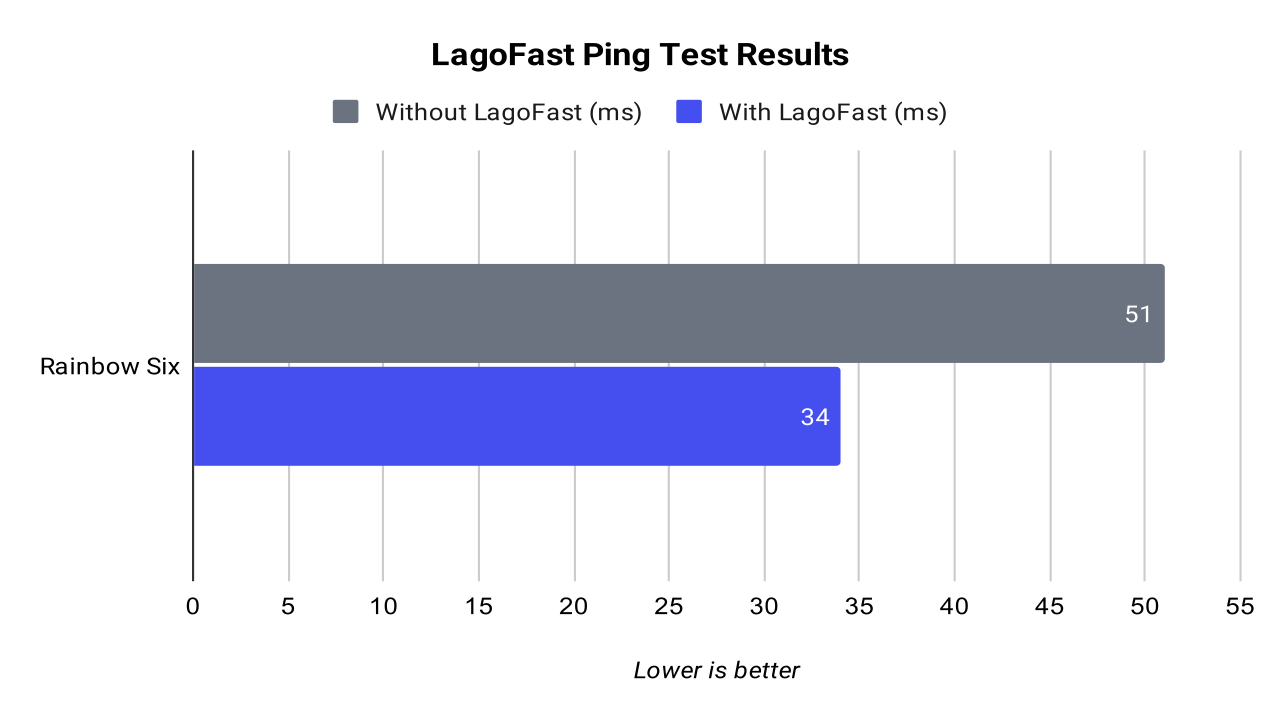
Rainbow Six Siege showed the strongest improvement in the entire test. Without LagoFast, the average ping was around 51 ms. With LagoFast enabled, the average dropped to around 34 ms. That is a 33.6% improvement, which makes Rainbow Six Siege the clearest example of LagoFast helping during this review.
The result was also consistent. The non-LagoFast side generally stayed between 49 and 54 ms, while the LagoFast side stayed between 31 and 37 ms. That means the improvement was not caused by one isolated moment; the optimized route stayed lower throughout the sampled gameplay.
For Rainbow Six Siege, LagoFast made a clear and measurable difference. Since R6 is a tactical shooter where latency can affect gunfights, peeking, and hit registration, this was one of the most relevant findings in the review.
Fortnite
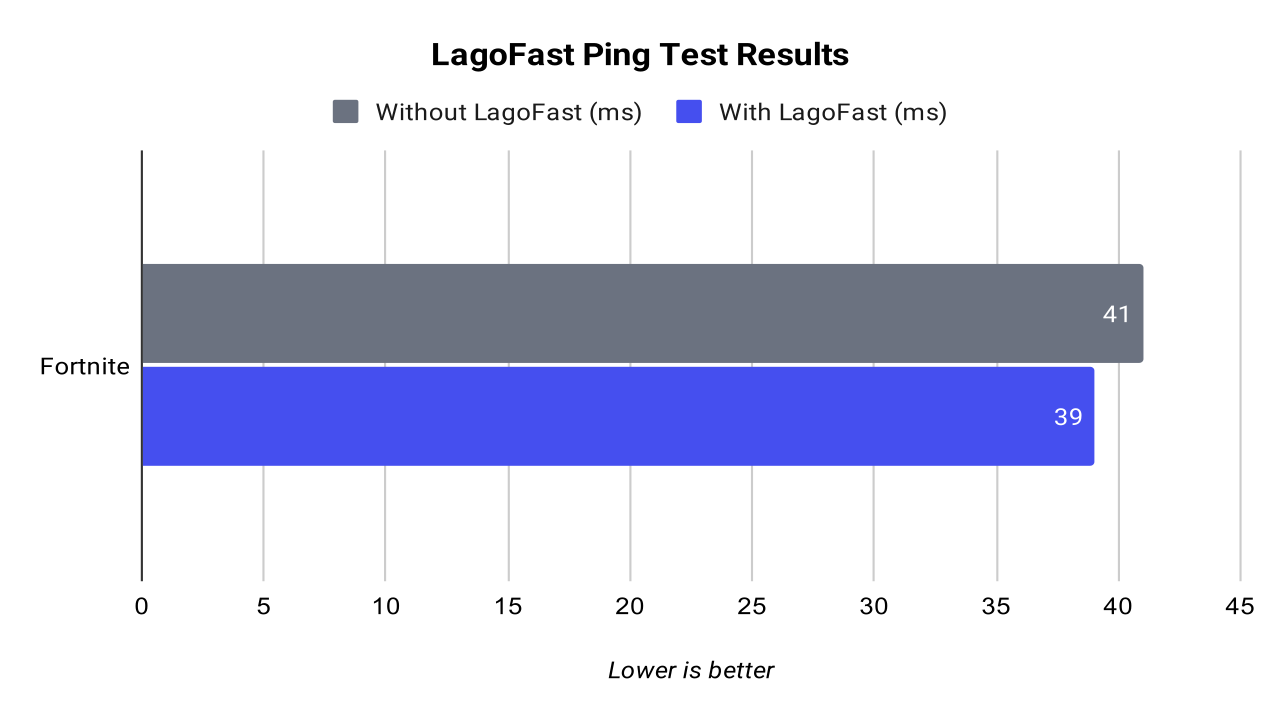
Fortnite showed the smallest improvement among the tested games. Without LagoFast, the average ping was around 41 ms. With LagoFast enabled, the average dropped to around 39 ms, which represents a 6.0% improvement.
The result was positive, but limited. The LagoFast side stayed slightly lower across most of the sampled moments, but the difference was not large enough to completely change the gameplay experience. Packet loss was not clearly visible in the overlay, so this test focused mainly on average ping and visible stability.
Based on this result, LagoFast did help reduce latency in Fortnite, but only slightly. This is a good example of how a game booster can improve routing without always producing a dramatic result.
Apex Legends
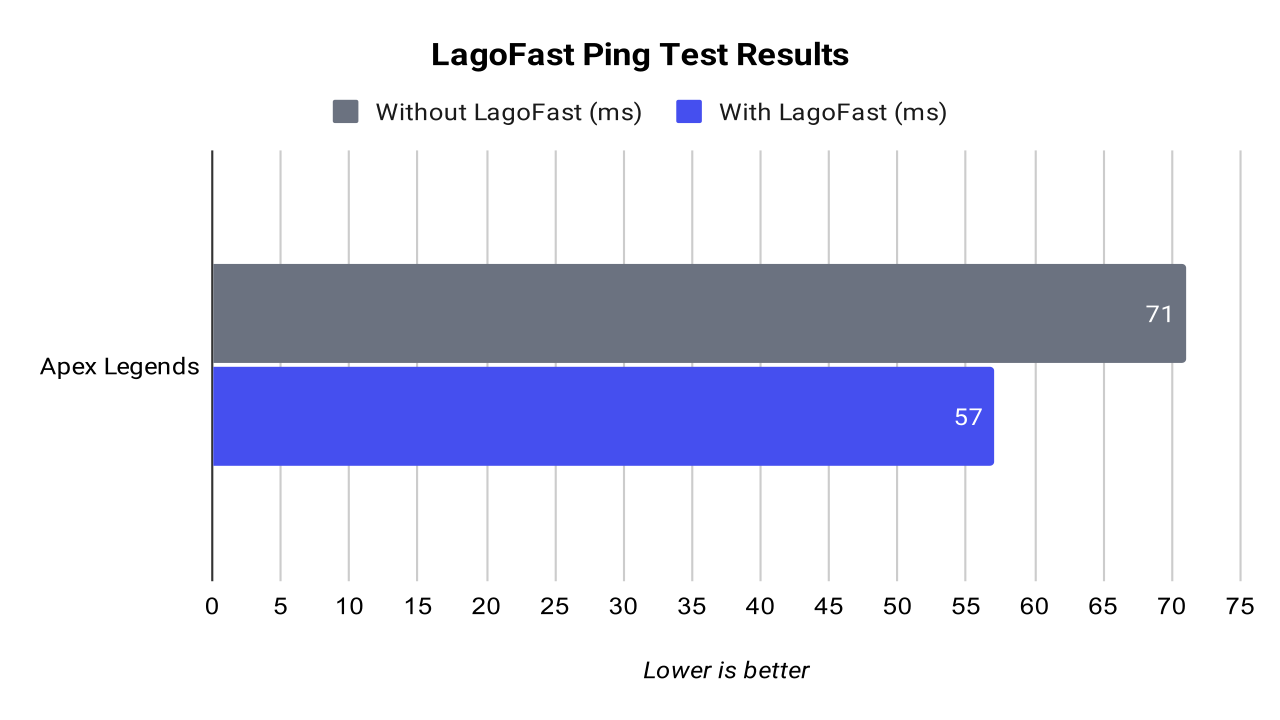
Apex Legends showed a much more noticeable improvement. Without LagoFast, the average ping was around 71 ms. With LagoFast enabled, the average dropped to around 57 ms, resulting in a 19.8% improvement.
This was one of the strongest findings in the review. The difference was large enough to be meaningful, especially in a fast battle royale like Apex Legends, where unstable latency can make tracking, movement, and close-range fights feel worse. The in-game network panel also showed loss 0/0 and choke 0/0 during the sampled moments, meaning the connection appeared stable in both tests.
The main advantage in Apex Legends was lower latency. LagoFast did not just produce a small numerical difference; it delivered a clear reduction in average ping compared to the default connection.
Overwatch 2
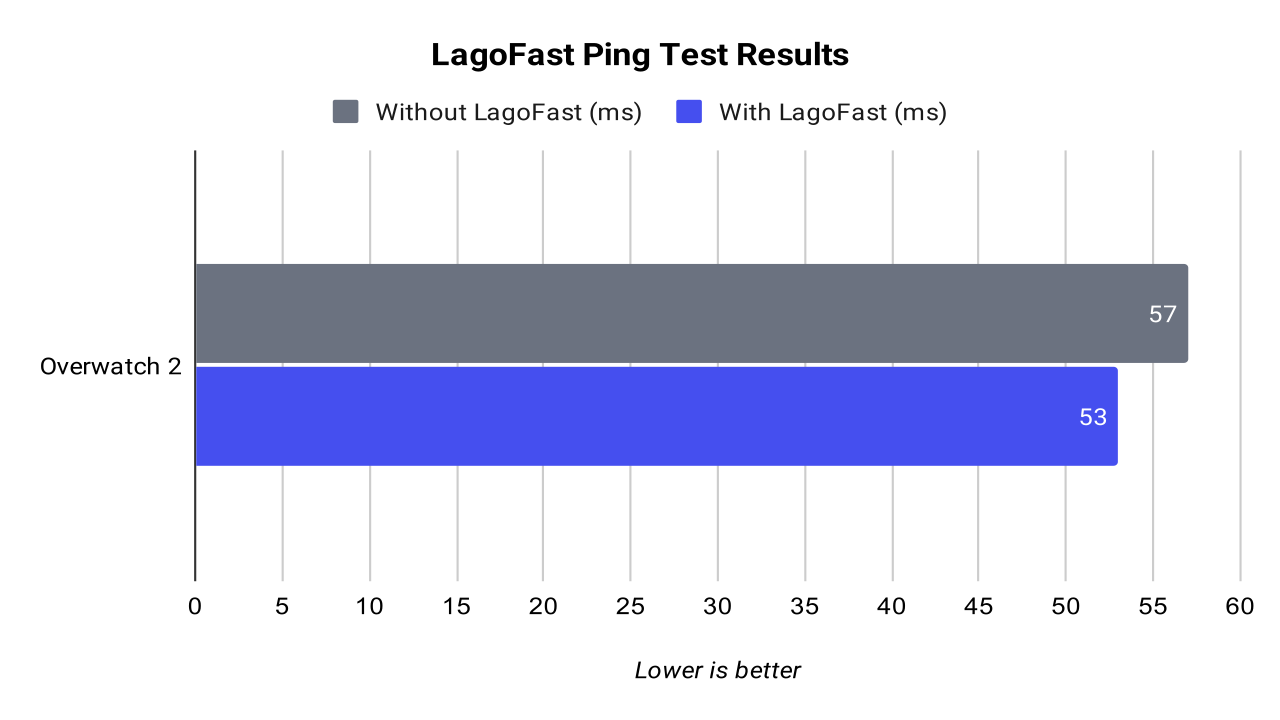
Overwatch 2 showed a moderate improvement with LagoFast. Without LagoFast, the average latency was around 57 ms. With LagoFast enabled, the average dropped to around 53 ms, which represents an 8.1% improvement.
The improvement was real, but not as strong as in Apex Legends, Warzone, or Rainbow Six Siege. The LagoFast side still showed one visible latency spike during the test, so the result was not perfectly smooth. Even with that spike, the average remained lower with LagoFast enabled.
In Overwatch 2, LagoFast helped reduce average latency, but the impact was moderate. It is a positive result, but not one of the most impressive examples from the review.
Warzone
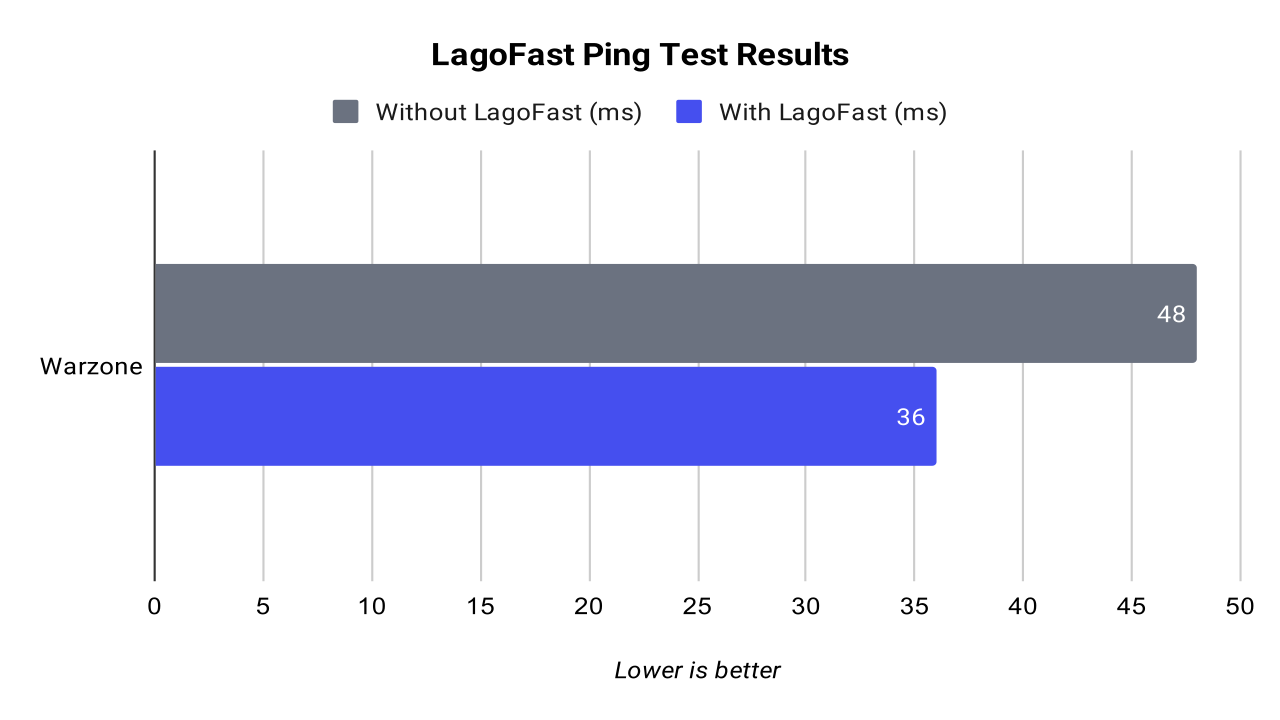
Warzone delivered one of the best readings in the test. Without LagoFast, the average latency was around 48 ms. With LagoFast enabled, the average dropped to around 36 ms, giving a 25.7% improvement.
This result was both strong and consistent. The non-LagoFast side generally stayed between 46 and 50 ms, while the LagoFast side stayed mostly between 35 and 37 ms. Packet loss remained at 0% on both sides, so the main improvement came from lower and more stable latency rather than packet loss reduction.
For Warzone, LagoFast performed very well. The lower average ping and tighter latency range made this one of the clearest examples where the optimized route provided a measurable benefit.
Full Ping Test Summary
Across all tested games, LagoFast reduced average ping in every case, but the size of the improvement varied significantly from game to game. The strongest gains appeared in Rainbow Six Siege, Warzone, and Apex Legends. These games showed the most meaningful latency reductions, with improvements of 33.6%, 25.7%, and 19.8%, respectively.
CS2, Valorant, Overwatch 2, and Fortnite also improved, but the gains were smaller. In those games, the default connection was already relatively stable, so LagoFast had less room to make a major difference.
Taken together, the test shows that LagoFast can reduce ping, but the outcome depends heavily on the game, server, region, and default ISP route. It is not a guaranteed fix for every connection problem, but when the default route is less efficient, LagoFast can provide a clear and measurable improvement.
Pros and Cons
LagoFast performed well in several of the tested games, but the outcome was not equally strong across every title. The tool is useful when it can find a better route than the default ISP path, but it should not be treated as a guaranteed fix for every connection issue.
Pros
- Clear ping reduction in some games: The strongest results appeared in Rainbow Six Siege, Warzone, and Apex Legends, where LagoFast produced noticeable latency reductions.
- Easy to use: The app is simple enough for most players. You select the game, enable the boost, and launch the game without needing advanced network knowledge.
- Useful for routing problems: LagoFast makes the most sense when your default ISP route to a game server is inefficient, unstable, or congested.
- Good for competitive games: Lower ping and fewer latency spikes can matter in shooters like Rainbow Six Siege, CS2, Valorant, Apex Legends, and Warzone.
- Supports many games: LagoFast covers a broad range of online titles, which makes it more useful than tools built around only one specific game.
- Can improve connection consistency: In some tests, the boosted route did not just lower the average ping, but also kept the connection within a tighter range.
Cons
- Results vary by game: LagoFast did not produce the same level of improvement in every test. Fortnite, CS2, Valorant, and Overwatch 2 improved, but the gains were more modest.
- Not a magic fix: The tool cannot fix weak hardware, bad Wi-Fi, poor local network setup, overloaded downloads, or an unstable internet connection at home.
- Requires testing: You still need to compare LagoFast on and off in each game. The best route can change depending on the game, server, region, and time of day.
- Not always necessary: If your default connection is already stable and well-routed, LagoFast may only reduce ping slightly.
- Paid service: LagoFast is not something every player will need to pay for, especially if their current connection already performs well.
- Marketing claims need real testing: Like most game boosters, LagoFast sounds impressive on paper, but the only way to judge it properly is by testing real games and comparing the results.
LagoFast Pricing and Plans
LagoFast pricing depends on the subscription length and whether the tool actually improves your connection in the games you play. At the time of this review, the app showed monthly, 3-month, 6-month, and 12-month subscription options.
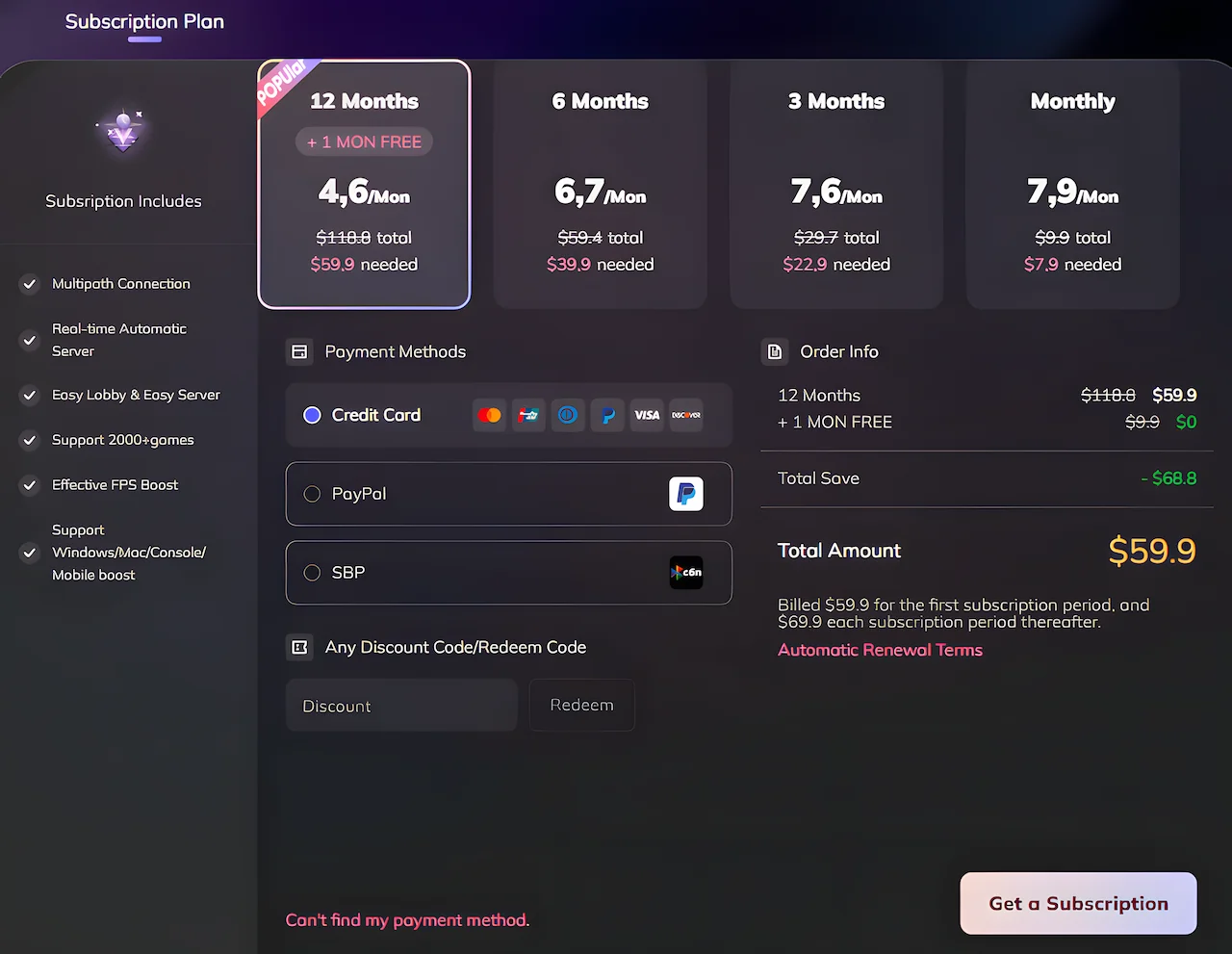
The 12-month plan was presented as the best-value option, costing $59.9 for the first subscription period and including one extra month for free. LagoFast also displayed this plan as approximately $4.6 per month, with the regular renewal price listed separately. The 6-month plan was listed at $39.9, the 3-month plan at $22.9, and the monthly plan at $7.9.
The pricing screen also mentioned features such as multipath connection, real-time automatic server selection, Easy Lobby and Easy Server, support for over 2000 games, FPS Boost, and support for Windows, Mac, console, and mobile boosting.
For most players, the monthly plan is the safest way to test LagoFast before committing to a longer subscription. Since performance can vary depending on the game, region, server, and ISP route, it makes sense to test the service in your main games first. If LagoFast clearly lowers your ping or makes your connection more stable, then the longer plans offer better value per month.
Players should also pay attention to automatic renewal terms before subscribing. LagoFast may offer discounted prices for the first subscription period, but the renewal price can be different afterward. Because of that, it is worth checking the total amount, renewal terms, and cancellation options before buying a plan.
Who Should Use and Who Should Not Use LagoFast?
LagoFast is not necessary for every player, but it can be useful in specific situations. The tool makes the most sense for players who already have a decent internet connection but still suffer from high ping, unstable routing, or inconsistent latency in certain games.
Who Should Use LagoFast?
LagoFast is worth trying if you play competitive online games and your connection feels worse than it should. This includes games like Rainbow Six Siege, Warzone, Apex Legends, CS2, Valorant, Fortnite, and Overwatch 2, where latency can directly affect aiming, movement, hit registration, and reaction time.
It is also useful for players who notice that some games have worse ping than others, even on the same internet connection. This usually means the problem may be related to routing, server location, or the path your ISP uses to reach the game server. In that situation, a routing-based tool like LagoFast has a better chance of helping.
LagoFast may also be useful if you play in regions where game servers are far away, overloaded, or inconsistently routed. If your default route to the server is poor, LagoFast can sometimes provide a cleaner and more stable path.
Based on my tests, players who mainly play Rainbow Six Siege, Warzone, or Apex Legends may benefit the most, since those games showed the strongest ping reductions during this review.
Who Should Not Use LagoFast?
LagoFast is not the right solution if your main problem is weak hardware, low FPS, overheating, stuttering, or poor graphics performance. A game booster may include FPS-related features, but it cannot turn a weak PC into a high-end gaming system.
It is also not ideal if your local network is already unstable. If you are using weak Wi-Fi, downloading files in the background, sharing bandwidth with many devices, or dealing with packet loss caused by your own connection, LagoFast may not fix the real problem. In that case, using an Ethernet cable, improving your router setup, or contacting your ISP should come first.
Players who already have very low and stable ping may also see only minor improvements. In games like Fortnite, CS2, Valorant, and Overwatch 2, the gains were positive but more modest. If your connection is already well-routed, LagoFast may not make a dramatic difference.
Finally, LagoFast may not be worth paying for if you are not willing to test it properly. The outcome depends on the game, server, region, and time of day. The best approach is to compare LagoFast enabled and disabled in your own games before committing to a longer subscription.
Is LagoFast Worth It?
LagoFast is worth trying if you regularly play online games and struggle with high ping, unstable routing, or latency that feels worse than it should be for your internet connection. Based on my tests, the tool produced measurable ping reductions in every tested game, although the size of the improvement varied depending on the title.
The strongest gains appeared in Rainbow Six Siege, Warzone, and Apex Legends. These games showed the most noticeable reductions, making LagoFast more convincing for players who mainly play competitive shooters or battle royale games where latency can directly affect gameplay. In these cases, the lower ping was not just a small number change; it was a clear improvement in the connection data.
However, LagoFast is not equally valuable for everyone. In games like Fortnite, CS2, Valorant, and Overwatch 2, the improvements were smaller. The numbers were still positive, but not dramatic. If your connection is already stable, well-routed, and low-latency, LagoFast may only give you a minor improvement.
That is why I would not recommend buying a long subscription immediately without testing it first. The best approach is to try LagoFast in the games you actually play, compare your ping with the tool enabled and disabled, and then decide if the improvement is worth paying for.
If you decide to try LagoFast, you can use the LagoFast discount coupon below to reduce the subscription price:
Use coupon code: GamesCatalogue
You can also use this LagoFast redeem code to claim free acceleration time if the promotion is available in your region:
LagoFast redeem code: GCBLOG
How to Redeem Free Acceleration Time
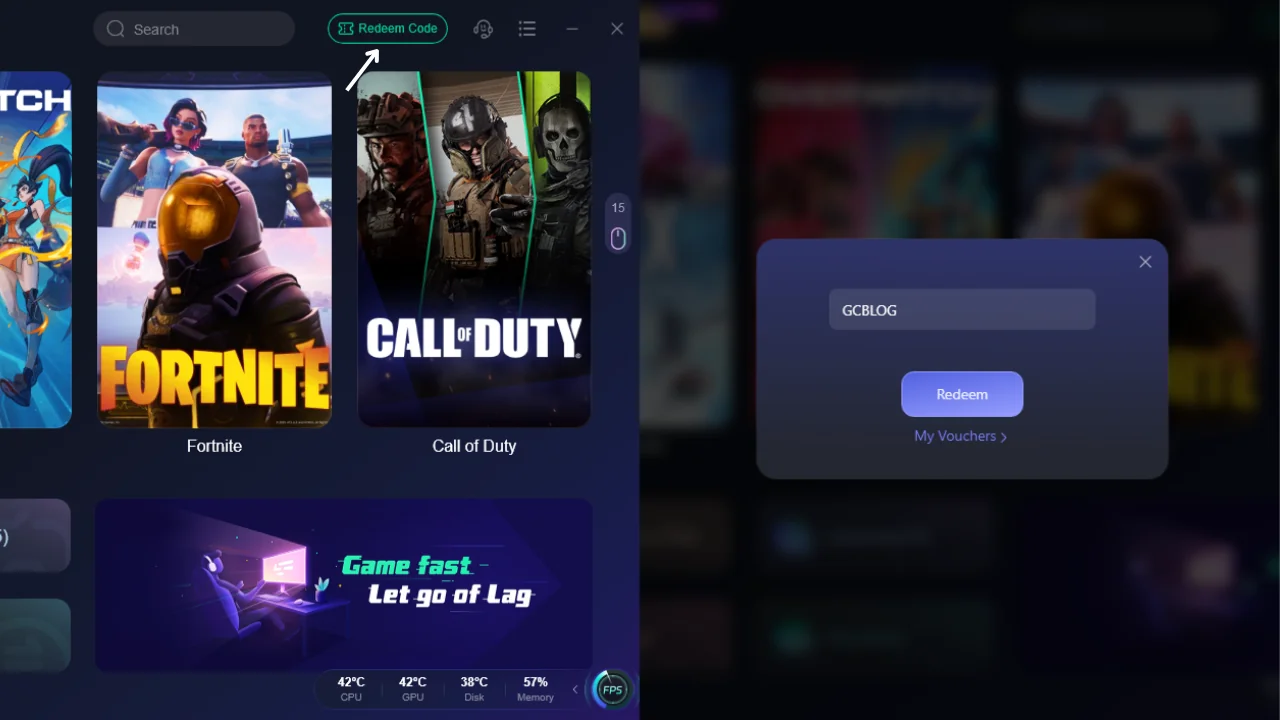
To redeem free acceleration time in LagoFast, open the LagoFast app and click the Redeem Code button at the top of the interface. Then enter the code GCBLOG and click Redeem.
This code is used to claim extra acceleration time inside the app. It is not the same as the LagoFast discount coupon used during checkout, and availability may depend on your region, account status, and LagoFast’s current promotion rules.
In practical terms, LagoFast is worth it for players who have a decent internet connection but still deal with bad routing, unstable ping, or higher-than-expected latency in specific games. It is not a magic fix for every network problem, but when it finds a better route to the game server, the improvement can be clear and measurable.
Final Verdict
LagoFast is good, but it is not a tool that every player needs. After testing it across several online games, my conclusion is that LagoFast is most useful for players who suffer from bad ISP routing, unstable latency, high ping, or inconsistent routes to specific game servers.
In the recorded tests, LagoFast reduced average ping in every game, with the strongest results appearing in Rainbow Six Siege, Warzone, and Apex Legends. Those were the clearest examples where the optimized route delivered a real benefit. For players who mainly play competitive shooters or battle royale games, this kind of ping reduction can matter, especially when the default connection path is unstable or inefficient.
However, LagoFast should not be used blindly in every situation. During one unrecorded Counter-Strike 2 test, my default route was already good and the ping was close to the lowest value I could realistically get. When I enabled LagoFast in that specific case, the ping actually increased by about 2 ms. That does not make LagoFast bad. It simply shows that a routing tool depends heavily on the current route, game server, region, and time of day.
Because of that, the best way to use LagoFast is to test it game by game. Turn it on, compare LagoFast enabled vs disabled, and keep using it only where it actually improves the result. In some games, the difference can be clear. In others, especially when your default route is already well optimized, the improvement may be small or even unnecessary.
In terms of pricing, LagoFast is reasonably competitive compared with other game boosters, especially when using a longer plan or a promotional price. It may not be worth paying for if your connection is already stable and the difference is only 1 or 2 ms. But if you regularly deal with bad routes, ping spikes, or higher-than-expected latency, the value becomes much easier to justify.
My final recommendation is simple: LagoFast is worth trying if you already have a decent internet connection but still suffer from poor routing, unstable ping, or inconsistent latency in online games. It will not fix weak hardware, poor Wi-Fi, or a broken internet connection, but when the real problem is routing, LagoFast can make a clear and measurable difference.
Want to compare these numbers? Our ExitLag Review and WTFast Review include similar latency and packet loss tests, making it easier to evaluate which software performs better.
FAQ (Frequently Asked Questions)
Is LagoFast free?
LagoFast is not completely free. It may offer a free trial or limited free access depending on the platform or promotion, but continued use usually requires a paid subscription. If you want to test it, the safest option is to try it first before buying a longer plan.
Is LagoFast legit?
Yes, LagoFast is a legitimate game booster service focused on routing optimization, lower ping, and connection stability. It has official apps, subscription plans, and support for many online games. That said, results can vary depending on your game, region, server, and ISP route.
Is LagoFast safe?
LagoFast should be safe when downloaded from the official website or official app stores. Like any network optimization tool, it routes game traffic through its own system, so you should avoid cracked versions, unofficial installers, or suspicious download links.
Is LagoFast a virus?
No, the official LagoFast app is not a virus. However, fake downloads, cracked versions, or modified installers can be dangerous. To avoid malware, only download LagoFast from the official website or trusted app stores.
Is LagoFast good?
Yes, LagoFast can be good if your main problem is bad routing, high ping, or unstable latency. In my tests, it reduced average ping in every recorded game, with the strongest results appearing in Rainbow Six Siege, Warzone, and Apex Legends. However, it is not a magic fix for weak hardware, bad Wi-Fi, or a broken internet connection.
Is LagoFast better than ExitLag?
LagoFast is not automatically better than ExitLag for every player. Both tools are designed to improve game routing and reduce latency, but the best option depends on your location, ISP, game server, and the games you play. The smartest approach is to test both services in your main games and compare ping, stability, and price.
Is LagoFast a VPN?
LagoFast is not a traditional privacy-focused VPN. It is mainly a game booster built for routing optimization, lower ping, and connection stability. However, some of its technology works in a VPN-like way by routing game traffic through optimized paths.
Is LagoFast paid?
Yes, LagoFast is mainly a paid service. It may offer a free trial or promotional access, but the full service usually requires a subscription. Monthly plans are better for testing, while longer plans usually offer a lower monthly cost.
Does LagoFast reduce ping?
LagoFast can reduce ping when it finds a better route between your device and the game server. In my tests, the biggest improvements happened in Rainbow Six Siege, Warzone, and Apex Legends. However, if your default route is already good, the improvement may be small or even unnecessary.
Can LagoFast increase ping?
Yes, it can happen in some cases. If your normal route is already close to the best possible path, using LagoFast may not improve it and could even add a small amount of latency. During one unrecorded Counter-Strike 2 test, my ping increased by about 2 ms after enabling LagoFast. That is why you should always compare LagoFast enabled and disabled before deciding to use it.